Posted in Arrays and Strings, Data Structures/ Leetcode, Recursion

Regular Expression Matching

Given an input string and a regex pattern, implement regular expression matching with support for ‘.’ and ‘*’.

  • ‘.’ matches any single character
  • ‘*’ matches zero or more of the preceding element (the char before *)

Examples

  1. s = ‘aa’, p = ‘ab’ Not a match
  2. s= ‘bbbbb’, p = ‘b*’ Match because ‘*’ matches zero or more of the preceding element b
  3. s= ‘fljflf’, p = ‘.*’ Match because we want to match zero or more of the preceding element which is any character in this case
  4. s = ‘oop’, p = ‘r*o*p’ Match because r is present 0 times, o is present twice and p is a direct match

Thought Process

Let’s approach this problem step by step.

Case 1: The simplest case would be when the given string and the pattern do not contain any ‘.’ or ‘*’ characters but only alphabets.

s = 'aa' and p = 'ab'

In this case we would check the string and the pattern from left to right to see if each character in the string matches the characters in the pattern.

a = a matched so far
b != a Match failed so return False

Case 2: When no ‘*’ characters are present but only ‘.’. In this case ‘.’ can match any single character. So we check for that condition and continue to check the remaining characters in the given string and the pattern using recursion.

def isRegexMatch(s, pattern):
    # If pattern is empty, as long as string is also empty => true
    # If pattern is empty but string is not empty => return false
    if not pattern:
        return not s

    # Check the first character match in s and pattern
    # String should not be empty
    # The first characters exactly match (Or)
    # pattern's first char contains "." to match any char in s
    is_first_char_match = len(s) > 0 and (s[0] == pattern[0] or pattern[0] == ".")
    
    # Continue checking the remaining characters using recursion
    return is_first_char_match and isRegexMatch(s[1:], pattern[1:])

Case 3: When the regex pattern contains both ‘.’ and ‘*’ characters, things get a little complicated.

Note that the pattern will never begin with ‘*’ because it denotes that a preceding character can be present 0 or more times. So it will ALWAYS be present only as the second character when that part of the pattern is being processed after a recursive call, For example: a*, .*

So we can have a condition that evaluates this logic as shown below.

if len(pattern) >= 2 and pattern[1] == "*"

If the above condition holds true, then we check regex match differently due to the presence of ‘*’. Let’s think about how we can do that. There are two valid scenarios that are allowed here.

Scenario 1: s = "aaaa", pattern = "c*a*"

In this case len(pattern) = 4 which is >= 2 and pattern[1] = ‘*‘. We see that c is not present in the string s but it can occur zero 0 or more times. In this case we can ignore checking the first two characters of the pattern and continue the recursion as shown below.

isRegexMatch(s, pattern[2:]) => isRegexMatch("aaaa", "a*")
Scenario 2: s = "aaaa", pattern = "a*"

In this case len(pattern) = 2 which is >= 2 and pattern[1] = ‘*‘. s contains ‘a’ which is a direct match with the first character in the pattern. So we check for first character match and continue recursion on the rest of the string.

is_first_char_match and isRegexMatch(s[1:], pattern) => a = a and isRegexMatch("aaa", "a*")

Note that we pass the full pattern string to the recursion call here because ‘*’ can match zero or more characters of ‘a’. So we want to check the string for that as well. The following recursive calls will hold true.

isRegexMatch("aaa", "a*") =>
is_first_char_match and isRegexMatch(s[1:], pattern) => a = a and isRegexMatch("aa", "a*")
isRegexMatch("aa", "a*") =>
is_first_char_match and isRegexMatch(s[1:], pattern) => a = a and isRegexMatch("a", "a*")
isRegexMatch("a", "a*") =>
is_first_char_match and isRegexMatch(s[1:], pattern) => a = a and isRegexMatch("", "a*")
isRegexMatch("", "a*") =>
isRegexMatch(s, pattern[2:]) => isRegexMatch("", "") so final result will be true.
if len(pattern) >= 2 and pattern[1] == "*":
    return isRegexMatch(s, pattern[2:]) or (is_first_char_match and isRegexMatch(s[1:], pattern))

Complexity

For a given string of length S and pattern P, we make recursive calls using indexes s[i:] and pattern[2j:] (When ‘*’ is present). The recursive tree can go to a depth of (S+P/2) which will have 2h leaf nodes where h = (S+P/2), so 2(S+P/2) leaf nodes. This means the recursion will branch into 2(S+P/2) sub-problems.

If we pass the entire string and pattern at the worst case, the complexity of solving a sub-problem will be O(S+P). So the time complexity will roughly be

O((S+P) * 2(S+P/2))

To read more about the complexity calculation for this problem, here’s a detailed article.

Putting it all together.

Solution

def isRegexMatch(s, pattern):
    # If pattern is empty, as long as string is also empty => true
    # If pattern is empty but string is not empty => return false
    if not pattern:
        return not s

    # Check the first character match in s and pattern
    # String should not be empty
    # The first characters exactly match (Or)
    # pattern's first char contains "." to match any char in s
    is_first_char_match = len(s) > 0 and (s[0] == pattern[0] or pattern[0] == ".")
    
    # When '*' is present in the second char of pattern
    if len(pattern) >= 2 and pattern[1] == "*":
        return isRegexMatch(s, pattern[2:]) or (is_first_char_match and isRegexMatch(s[1:], pattern))

    else:
        # Continue checking the remaining characters using recursion
        return is_first_char_match and isRegexMatch(s[1:], pattern[1:])

Hope you enjoyed solving the regular expression problem. In the next post, we will look at how to improve upon this solution using Dynamic Programming!

Posted in Health, Professional Improvement

Managing Pandemic Fatigue As a Software Engineer

Remind yourself about why you do what you do

Why are you an Engineer?

If you are feeling a lack of motivation and purpose at work, it’s important to take a step back and understand why you are doing this in the first place. Is it because you love coding, solving problems, managing projects, or working alongside talented people and learning from them? Or maybe you took it up to support yourself or your family financially.

Once you know why you are at this job, try and find out what parts of it are causing the lack of motivation. Perhaps you are stuck at a boring job, or a project that you don’t enjoy or maybe you are working overtime losing track of hours in front of the computer. Have conversations with your manager on what kind of work you would like to do once you have completed the current project and ask if there are certain parts of it that you can delegate to make space for work that interests you. You might be tempted to slog off without communicating but remember that a lack of motivation can kill productivity and the quality of work that you produce which is a lose-lose situation for your career and the company that you work for. If you tried that and you still feel miserable, see if it’s time to look for opportunities outside your company.

Take care of physical and mental health

Take care of Health

Spend a few minutes 3 to 5 days a week to get a quick exercise session in the morning or after work. Establishing a morning/evening routine can help kick start the day in a right way and also make sure that you log off on time after a day’s work. Stretching for few minutes every hour is very helpful to offload the stress from the body from sitting and working in front of a laptop all day. The marinara chrome extension is a super useful tool to schedule focus time with short and long breaks throughout the day.

Have you been waking up and feeling too tired or fatigued to work, more often than before? The pandemic is an enormously difficult time for people around the world. So you are not to be blamed for not feeling up to it. Mental health is as important or in fact more important than physical health. So don’t skimp on taking a couple of sick days off to catch your breath.

If your problems are chronic or are really impacting work, look into ways in which you can get help. You can reach out to your support system or consider therapy to help you navigate the situation. Many companies have been offering various sessions for boosting morale and supporting employees through these difficult times. Try attending them once in a while. Here’s a quick summary of the different ways to care for our health.

  • Exercise for 30 minutes everyday
  • Do mindful meditation for 5 to 10 minutes
  • Stretch every hour or two
  • Eat food that nourishes your brain and body
  • Take time to address mental health issues
  • Spend time outside of work on hobbies
  • Take breaks when you are fatigued
  • Reach out to your social circle
  • Invest in building deeper connections at work

Verbalize the stress

Verbalize the stress

We tend to go through a lot of stress assuming that our colleagues don’t have these problems since they all seem fine externally. It’s mutually helpful to check on your team mates and connect with others around the company who are also dealing with the stressors of the pandemic. This can be a great way for employees to share their stories and exchange helpful tips to move forward through all this. Verbalize your stress by talking about it to others, in coffee chats, or with a licensed therapist. You can also try writing them down, journaling etc which can offload the stress and give you some time to think through it and address them.

Take a vacation

Take a vacation

Many of us might save all the vacation leave not wanting to waste them unless we are on an Instagram worthy vacation. On the contrary taking a shorter/ longer break every few months from work is so important to cope with work life let alone with a pandemic thrown into the mix!

Not taking breaks leads to burnout which can take a huge toll on our health and also impact the quality of work seriously. This becomes a vicious cycle as Engineers tend to lose motivation and purpose when we are not able to produce high quality work.

Find meaning outside of work

Spend time outside of work

For many people, work is a huge part of their identity and this makes them ignore other parts of their lives which can have a significant impact on their well-being. Take time everyday to actively strengthen the aspects of your life beyond work. This could be spending time with your family, friends or neighbors, taking time out for your hobbies and interests, pursuing a side hustle that you are passionate about etc.

Another mistake that a lot of Engineers do is to treat work as their major hobby and don’t take time for anything else in life. This results in overworking beyond work hours which can eventually lead to burnout and a lack of focussed work because increased work hours do not lead to an increase in productivity. In fact, it lowers it significantly. People who take time out to do other things have improved creativity in a problem solving environment.

Have short term goals

Have short term goals

With no definite end in sight, the pandemic can seem like a never ending drag. So focus on short term goals at work to check off every quarter or month. Work with your manager and write these goals down in a shared document so that you have something to work towards in a shorter span of time. Make sure that these goals are reasonable and attainable with a few stretch goals to try and challenge yourself in case the others have been accomplished.

Hope these tips are helpful to you. Above all, be kind to yourself and understand that the world is going through an intense pandemic and we were not prepared to go through the motions of life without being affected by it. Stay safe!

Posted in Better Programming

5 Useful IntelliJ Shortcuts On MacOS

1. Cmd + / or ⌘/

This is a shortcut that can be used across several IDEs to comment out a line. You can use it again to uncomment the line as well.

2. Alt + Enter

It can be annoying to see some lines of the code show up in red. This is a super useful command that gives a list of suggestions to fix your code once you place the cursor on that line and click Alt + Enter. IntelliJ also calls this the problem solving shortcut and there’s a detailed article on their blog on how you can use this to accomplish various context actions.

Alt + Enter

3. Shift Shift

This opens a search box to search everywhere across the code. You can search across Classes, Files, Symbols and Actions.

Shift Shift

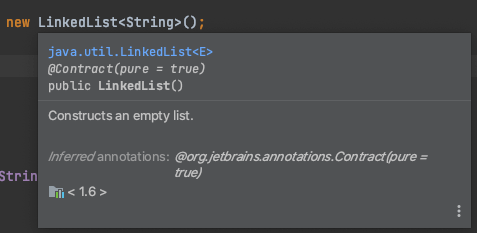
4. Cmd/⌘

When you hover the cursor on a certain keyword, it shows a short description of the highlighted entity. If you click on it, IntelliJ displays the definition of the highlighted class, method or keyword. On the other hand holding Cmd/⌘ and clicking on the keyword will take you to the actual definition of that Datatype, Method, Class etc

Hovering over the keyword

5. Alt + Command + Arrow Keys

This is one of my super favorite shortcuts. Pressing Alt + Cmd + Left/ Right arrow keys lets you navigate back and forth between lines of code that you just looked at.

I hope this article was helpful and short enough for you to remember the shortcuts and try them out in your IntelliJ IDE!

Posted in Professional Improvement

10 Best Practices For Software Engineers To Ensure a Successful Onboarding

1. Version Control Systems

Learning and mastering the basics as well as frequently used version control concepts are crucial for Engineers to make onboarding easier. It also helps to set oneself up for productive future work. If your company uses a graphical UI for source control, there is a temptation to never learn the Command Line Interface (CLI) but you will eventually have to work at companies who extensively use the CLI. If you are going to be using the Git Version Control System, then here’s my article on some of the Git commands that I have used the most in my career. This should get you through 90% of your Git encounters.

2. Befriend Your IDEs

As soon as you meet your team, find out about IDE(s) they prefer to use. If there’s a clear majority, spend some time learning the basics of using it, including but not limited to cloning repositories, automatic deployment and syncing code changes with a remote host, debugging workflows, automatic refactoring – For example, IntelliJ offers a way to refactor a constructor and replace it with with either a Factory or Builder pattern in Java which can come very handy. Learn shortcuts to search for files, keywords, classes, functions etc. in any code base.

3. Searching For Information

Some companies do a great job of documenting their code, processes and knowledge base and some don’t. Wherever you are, it helps to understand how to search for documentation, previous conversations or issues around a certain topic, code search, ticket search if you’re using a tool like JIRA to manage tasks. The ability to know where and how to search for information facilitates a natural curiosity to indulge in problem solving time before deciding to give up too early and reach out for help. Eventually you might enjoy helping out other Engineers as well with their questions which solidifies the knowledge gained.

4. Regular 1:1s With Manager/ Mentors

One aspect of my current job that I enjoy the most are the 1:1s I have with my manager, mentors and mentees every week. These are some ideas to help you get started with 1:1s with your manager.

  • How did you feel about last week’s work? How was your weekend?
  • What did you most enjoy working on?
  • What exhausted you and is there some help that you need?
  • Feedback on team members/ projects
  • Any areas where you struggle with or need more information on
  • Suggestions for team improvements
  • Any feedback you have for your manager

An important thing to remember here is to be candid in your 1:1s which will make it easier for others to help or guide you in the right direction. If you are bored working on something, voice it!

5. Do Code Reviews

Find opportunities to do code reviews for your team members. If you are super new to the team, ask to be added to the code reviews of repositories that you will soon be working with. This is a great way to understand what kind of changes are pushed and how the technical material that you’re reading links to actual code. It also exposes the coding standards to adhere to within your team. If you are already familiar with the coding language used by your team, this is a great opportunity to warm up to new code while helping the team with the expertise that you are bringing in.

6. Mix It Up

Onboarding can get boring and overwhelming when you spend all your day reading up on documentation. Try to have a good mix of concrete coding tasks as well as something to read and absorb since you will have to look up all that information later anyway. Take regular breaks and make notes of terms that you want to look up later. Get a breath of information before deciding to dive deeper into a particular topic. If things get too difficult to comprehend, setup a 1:1 with a team member and ask for a quick walkthrough.

7. Get To Know The Team

Setting up 1:1s with all your team mates in the first few weeks of joining a new team will bring a sense of familiarity and comfort as a new Engineer. It’s also the time to discover the expertise and interests of people in the team and you may even find a great mentor.

Another aspect of knowing the team is to learn what you will actually be doing. Think of questions such as this.

  • Who are your customers?
  • What products do you build and own?
  • Where can you find a list of repositories owned by the team?
  • Any important code that you can take a look at?
  • How does the team contribute to the company’s growth?
  • How is your team adding value to other teams across the company?
  • Get a team member to subject expertise mapping from your manager to understand who would be the best person to help you with certain topics

8. Set Clear Objectives

Having a clear set of objectives makes sure that onboarding does not feel like a never ending process. Your team probably owns a lot of code and processes but it’s important to not get overwhelmed by it and instead focus on a small subset of core topics and tickets to work on. If the ramp up is draining or overwhelming, do reach out to your manager. When you work outside of office hours or withhold from surfacing the challenges that you are facing, you miss out on giving valuable feedback on the onboarding process. This could potentially help out future members joining the team. As you check off items on your ramp up, make sure to keep notes on what’s working and what isn’t, any questions that you have and links that you want to read up on later. This is a great way to build your knowledge base.

9. Look Outside Your Team

One of the first and foremost things that I did when I joined my current company Yelp was to scan for organizations or employee groups that I’d love to connect with outside of my team. For more than a year now, I have absolutely enjoyed participating in various events and programs for Women in Engineering. 1:1s are a great place to express your areas of interests and colleagues almost always remember to point you to some amazing groups that you can be a part of. These are also great opportunities to grow as an Engineer and a leader outside of regular coding tasks. Get to know about some interesting communication channels or emails you can subscribe to.

10. Wrap Up Onboarding The Right Way

  • Make sure to offer feedback on the onboarding process and mentorship that you have received so far. Highlight the work that interested you most and any challenges that you faced with existing processes, codebases or systems.
  • Find ways to improve existing code, documentation or processes however small it might be.
  • Talk to your manager about areas that you felt aligned better with your interests and see if there are existing projects that you can be a part of.
  • If you think you got the most out of your mentorship, feel free to space out your future sessions or be on a lookout for new mentors in your areas of interest.

A well laid out onboarding process is when you feel slightly uncomfortable and challenged in good ways but not overwhelmed to a point of exhaustion. That’s the sweet spot to find – not too easy, not impossible either like the Goldilocks Effect on Infants! Hope you enjoyed reading this post. If you have more ideas on how to improve onboarding, feel free to leave your comments on this post. Have a great week!

Posted in Better Programming

Essential Git Commands To Improve Project Workflow

1. Convert a repository into a Git repository

This will create a .git sub folder in your project directory.

$ cd <PROJECT_DIRECTORY>
$ git init

2. Clone a repo and pull the latest changes

$ git clone <GIT URL>
$ git pull

3. Create a new branch

$ git checkout -b <DESCRIPTIVE BRANCH NAME>

# View all branches
$ git branch

# Checkout an existing branch
$ git checkout <BRANCH_NAME>

4. Delete a branch

# Delete a local branch
$ git branch -d <BRANCH NAME>

# Delete a remote branch
$ git push origin --delete <BRANCH NAME TO DELETE>

5. Rename a branch

# From the branch to be renamed
$ git branch -m <NEW BRANCH NAME>

# From another branch
$ git branch -m <OLD BRANCH NAME> <NEW BRANCH NAME>

# Steps to rename a remote branch after following the above steps
$ git push origin -u <NEW BRANCH NAME>

# Delete old remote branch
$ git push origin --delete <OLD BRANCH NAME>

6. Pull the latest changes from the master branch

There are two ways to pull the latest changes from master into your branch. Tip: If you are working on a complex change, pull the changes from master often (once or twice everyday depending on how frequently new changes are shipped to master). This will save a lot of time not having to deal with merge conflicts.

Do a merge

Note: In this way, you can checkout master and pull all the latest changes into your branch but will have to solve multiple conflicts that arise from this scenario. Solve any conflicts that come up after executing the following commands.

$ git checkout <YOUR BRANCH>
$ git merge master

Do a rebase

$ git checkout <YOUR BRANCH>
$ git rebase master

Not sure whether to do a merge or rebase? Checkout this tutorial on merging vs rebasing.

7. Commit and push changes

# Check the changes you have made
$ git diff

# Stage all the changes
$ git add .

# Stage only a single file
$ git add <FILE NAME>

# Commit the changes
$ git commit -m "Commit message"

# Stage changes and commit one-liner
$ git commit -am "Commit message"

# Check if everything looks okay
$ git status 

# Push changes to remote
$ git push origin master

8. Save changes locally without committing

# Save uncommitted changes in a stack where you can get it back later
$ git stash 

# To retrieve the stash and apply it on top of your branch
$ git stash apply 

# Save stash with a name
$ git stash push -m "Name of the stash"

# To view list of all stashes
$ git stash list 

# Apply a stash with index n
$ git stash apply stash@{n}

# Apply a stash and pop it from stack
$ git stash pop stash@{n}

9. Pull the latest changes into a branch

This can result in change conflicts which have to be resolved.

$ git pull

10. Check commit history

This will display an entire scrollable commit history of your repository.

$ git log

11. Merge branch with master

# Squash and merge if there are too many noisy commits
$ git checkout master
$ git merge --squash <BRANCH TO MERGE>
$ git commit

# Regular merge
$ git checkout master
$ git merge <BRANCH TO MERGE>
$ git push origin master

12. Something’s on fire! Revert!

# Revert a single commit
$ git revert <COMMIT SHA>

# Revert Multiple commits
# Note: Works well only if there are no merge commits done
$ git revert <OLDEST COMMIT SHA>..<LATEST COMMIT SHA>

# Revert multiple commits and retain commit history
# Note: Works with merge commits
$ git checkout -f <TARGET COMMIT SHA> -- .
$ git commit -m 'revert to <TARGET COMMIT SHA>'
$ git diff HEAD # To check

These commands have helped me get 90% of my work done during all these years. Special scenarios have been pretty rare and they definitely warrant a deeper understanding before diving into them. Good luck!