

HTML (Hyper Text Markup Language) and CSS (Cascading Style Sheets) are both important technologies used in Web Development but when I came into Backend Development I did not know much about these. I still haven’t had the need to work with them except for a newsletter that I was putting together every month for a year but that made me feel interested to learn more. This article will go over some of the basics that are useful to know as a Backend Developer with a lot of useful resources for further study.
HTML
A basic HTML document is a text file made up of elements and tags. The first page is named as index.html. There are various tags but the following make the overall outline of the document.
- <!DOCTYPE html> as the first line of an html document so that browsers can render the page correctly.
- <head></head> contains any machine readable information
- <html></html> that contains all the document content
- <body></body> which contains all the parts visible in a browser
<!DOCTYPE html>
<html>
<title>Title</title>
<head>
</head>
<body>
    <h1>This is the first heading</h1>
    <p>This is the first paragraph</p>
</body>
</html>
HTML Tags
Here are a few other important html tags.
| Tag | Description |
| <h1></h1> to <h6></h6> | Heading tags |
| <p></p> | Paragraph tag |
| <img src=”image.jpeg” alt=”Name of the image” width=”100″ height=”100″> | Image tag |
| <a href=”www.wordpress.com”>Text for this link</a> | HTML links |
| <table></table> | Table |
| <th></th> | Table header |
| <tr></tr> | Table row |
| <td></td> | Table data |
| <div></div> | Container for HTML block level elements and styling |
| <span></span> | Used to organize inline elements |
| <link> | Link a CSS stylesheet |
Here is a simple webpage using some of the above elements. Try it in your own browser as well!
<!DOCTYPE html>
<html>
<title>HTML AND CSS</title>
<head>
</head>
<body>
<h1>HTML and CSS basics</h1>
<p1>Differences between HTML and CSS</p1>
<br></br>
<table border="1">
    <tr>
        <th>HTML</th>
        <th>CSS</th>
    </tr>
    <tr>
        <td>Stands for Hyper Text Markup Language</td>
        <td>Stands for Cascading Style Sheets</td>
    </tr>
    <tr>
        <td>Used to build static web pages and applications</td>
        <td>Used to enhance the presentation of an HTML document</td>
    </tr>
</table>
<a href="thatgirlcoder.com">Learn more here!</a>
</body>
</html>
This is the web page as rendered by the browser.

You can find a list of all HTML elements here.
Block vs Inline Elements
| Inline | Block |
| Does not start in a new line | Always starts in a new line |
| Takes up as much width as needed only | Takes up full width |
| Examples: <span>, <a>, <br>, <img> etc. | Examples: <p>, <div>, <table>, <form>, |
CSS
CSS stands for Cascading Style Sheets and a styles.css file can be defined to link to an HTML document to change its styling.
CSS can be applied to an HTML page either internally or externally. To use it internally, the <style> tag is used as follows.
<!DOCTYPE html>
<html>
<head>
    <title>Title</title>
    <style>
        body {
            background-color: #e1b382;
        }
    </style>
</head>
</html>
To apply an external stylesheet, the <link> tag is used as shown below.
<head>
    <link rel="stylesheet" type="text/css" href="<CSS_FILE_NAME">
</head>
Selectors
In CSS, different types of selectors are used to select various HTML elements to apply styling rules to. Some of the important type of selectors are as follows.
Element Selectors
This is used to select HTML elements based on type such as <p>, <h1> etc.
<h1>This is a heading</h2>
.h1{
    color: #xyz;
}
ID Selectors
This uses the ID attribute of an HTML element.
<div id="section"></div>
#section{
    color: #xyz;
}
Class Selectors
Selects using the class attribute of HTML elements.
<p class="paragraph">Start reading!</p>
.paragraph {
    color: #xyz;
}
Descendant Selectors
This is used to select HTML elements contained within another selector. In the below example, the color will be applied to all the <h1> elements that are descendants of the span ID element.
<span id="span">
    <h1>Heading 1</h1>
    <h1>Heading 2</h1>
</span>
#span h1{
    color: #xyz;
}
Child Selectors
This is more specific that descendant selectors. This will select the immediate descendants (ie., children) of a parent selector. In the below example, the color will be applied only to the immediate children of the “section” Id which are “Heading 1” and “Heading 2”
<div id="section">
    <h1>Heading 1</h1>
    <h1>Heading 2</h1>
    <div>
        <h1>This is a nested heading</h1>
    </div>
</div>
#section > h1 {
    color: #xyz;
}
CSS Box Model
The box model consists of the following properties to represent an HTML element as a box.
- Content – text, images etc
- Padding – area around the content
- Border – non-transparent area around the content and padding
- Margin – area around the border
I like to remember this as MBCP from outer most Margin to inner most Content.
div {
  width: 200px;
  border: 10px blue;
  padding: 20px;
  margin: 20px;
}
Now let’s design a super simple food menu as shown below. I have included the css code in the same file so that you can use it in any online code editor.
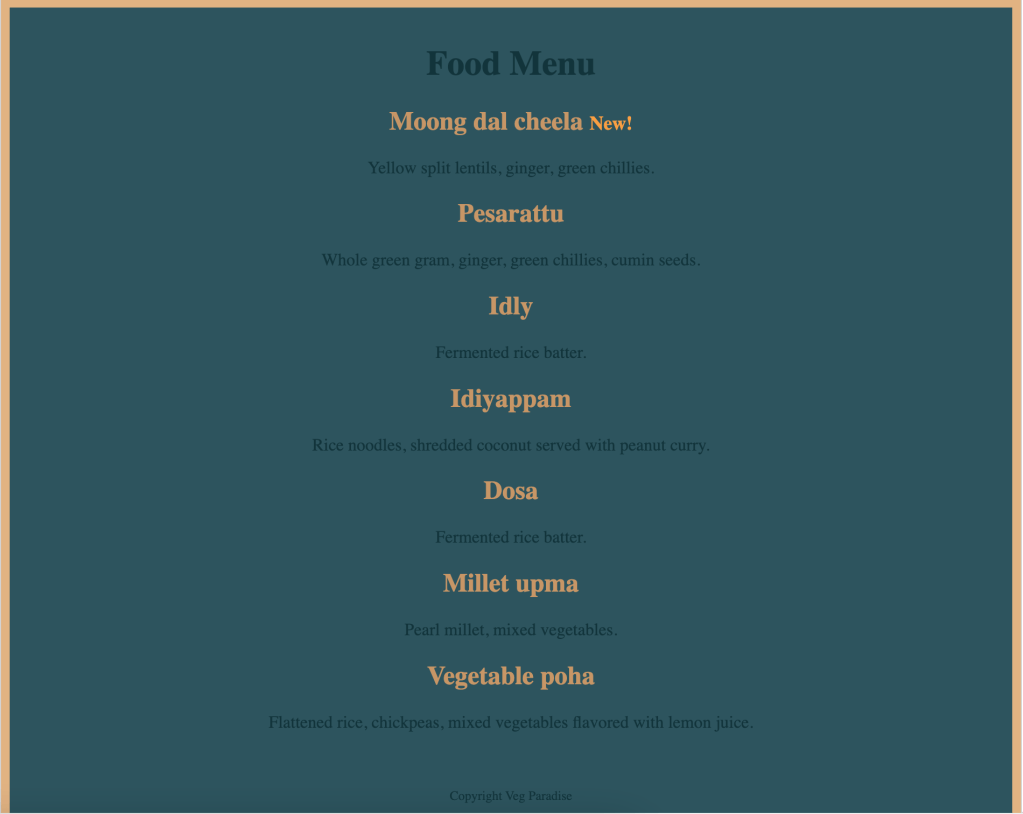
<!DOCTYPE html>
<html>
<head>
    <title>Veg Paradise</title>
    <style>
        body {
            background-color: #e1b382;
        }
        h1 {
            color: #12343b;
        }
        h2 {
            color: #c89666;
        }
        .center-text {
            margin-left: auto;
            margin-right: auto;
            text-align: center;
            padding-top: 12px;
            padding-bottom: 12px;
            background-color: #2d545e;
        }
        p {
            color: #12343b;
        }
        h2 > span {
            color: #FA9F42;
            font-size: 0.75em;
        }
        #copyright {
            font-size: 0.75em;
        }
    </style>
</head>
<body>
    <div class="center-text">
        <h1>Food Menu</h1>
        <h2>Moong dal cheela <span>New!</span></h2>
        <p>Yellow split lentils, ginger, green chillies.</p>
        <h2>Pesarattu</h2>
        <p>Whole green gram, ginger, green chillies, cumin seeds.</p>
        <h2>Idly</h2>
        <p>Fermented rice batter.</p>
        <h2>Idiyappam</h2>
        <p>Rice noodles, shredded coconut served with peanut curry.</p>
        <h2>Dosa</h2>
        <p>Fermented rice batter.</p>
        <h2>Millet upma</h2>
        <p>Pearl millet, mixed vegetables.</p>
        <h2>Vegetable poha</h2>
        <p>Flattened rice, chickpeas, mixed vegetables flavored with lemon juice.</p>
    </div>
    <div class="center-text">
        <p id="copyright">
            Copyright Veg Paradise
        </p>
    </div>
</body>
</html>
Hope you learned the basics of HTML and CSS to navigate web development as a Backend Engineer. I recommend the following resources when you are programming.
 That Girl Coder