
Almost all of the apps that we use regularly have a search bar to retrieve results relevant to our search terms – Google, Yelp, Amazon, YouTube etc. As the traffic to these websites scale up, the corresponding Search Backend Infrastructure needs to be able to handle that volume of incoming traffic successfully while ensuring fast and efficient user experience.
We need a Distributed Search Infrastructure to handle these large-scale operations where the Indexing and Search workload is distributed across multiple servers or nodes. This ensures high Availability, Scalability and Low Latencies compared to a system with only server.
Popular Distributed Search Infrastructures
- E-Commerce Platforms – Amazon, Etsy etc
- Social Media – Instagram, YouTube, TikTok etc
- Web Search – Google, Bing etc
- Enterprise Search – Document search etc
Distributed Cluster Architecture
A distributed search cluster contains a group of nodes. Different nodes perform different functions. For example, in Elasticsearch
- Master Node – this controls an Elasticsearch cluster responsible for many cluster level operations such as creation, deletion of indexes etc.
- Data Node – this is where the inverted index containing the search data lives.
- Client Node – this is used for routing the incoming search requests to other clusters.
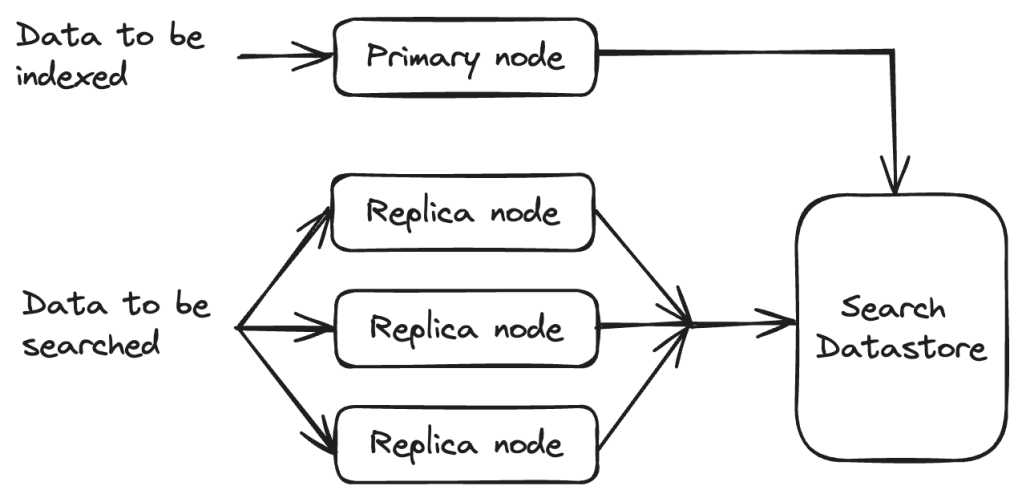
There are other search infrastructures such as Nrtsearch where Indexing and Search is split across different sets of nodes.
- Primary – single node that does all the indexing.
- Replica – one to several nodes that serve all the search traffic. The number of replicas can be scaled horizontally based on the traffic.
Distributed Search Infrastructure – Design Considerations
Scalability, Reliability, Availability and Performance are some of the crucial aspects to design a Distributed Search Infra.
Scalability
Horizontal Vs Vertical Scaling
In Horizontal Scaling, more servers are added to an existing distributed search infra to handle the increasing load. This is easier to scale and cheaper as well to add more servers to a network. This makes the infra more fault tolerant since new nodes can come up when others go down. Ensuring Data Consistency is a challenge.
In Vertical Scaling, more resources to added to existing machines (CPU, RAM etc). Although this is easier to do than adding new machines, there is a limit on how much a single machine can scale. Higher specifications mean higher costs and this is not as fault-tolerant as Horizontal Scaling.
Load Balancing
There are different ways to distribute incoming search requests to ensure that traffic is distributed across multiple servers. This ensures that no single node is overwhelmed with search requests. There are many ways to do this and some of these techniques are listed below.
- Round Robin
- Least Connections
- Geo-based
- Resource-Based
- Weighted Round Robin
- Weighted Least Connections etc.
Availability
High availability is achieved by ensuring that data is replicated across multiple nodes as well as regions to ensure better fault tolerance.
Replication can be done Synchronously or Asynchronously. In Synchronous replication, data is copied to replicas simultaneously and in Asynchronous replication, it is copied after the original operation completes. It is important to ensure Data Consistency during asynchronous replication.
Distributed Data Indexing
Indexing refers to storing data efficiently for fast retrieval at search time. Search Engines usually build an Inverted Index which maps terms to document IDs. The term frequency and the term positions are also stored along with the document ID. This list is commonly referred to as a Postings list.

Distributing data across multiple servers allows for scaling the cluster later as the data size increases. We need to load only a small part of the data into memory during search time. We can also employ techniques such as Scatter-Gather where the search requests are sent to multiple clusters/ shards in parallel which enables fast search operations.
Partitioning of indexes can be done in several ways:
- ID Sharding – each shard contains a range of IDs and we try to maintain a relatively even distribution of data across the different shards.
- Geo Sharding – each shard contains a range of documents from a certain geo location or region.
- Hash-based Sharding – hash functions are applied to the sharding key to decide the shard to which the data is to be indexed. Hash collisions should be handled carefully.
We can also do Hybrid Sharding combining multiple sharding strategies based on the use case.
Distributed Search Operations
It is good design to have a set of coordinator nodes that take an incoming query and route it to the right node for searching. Coordinators can also send requests to multiple nodes in parallel, aggregate the results before sending a final response back to the user.
This type of parallel processing is one of the key advantages of a distributed search infrastructure.
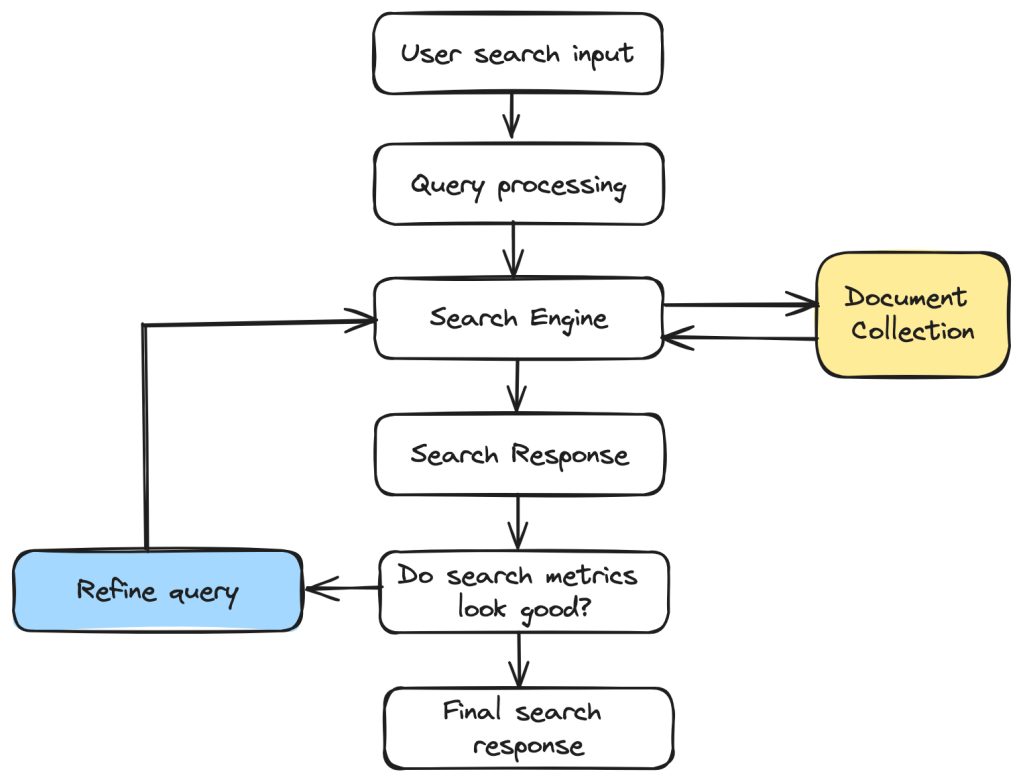
To decide which results are the most accurate and relevant results to show to the user, search engines employ various algorithms that calculate the Precision and Recall scores before returning only the top results. Further manipulation and filtering can be done on top of these ranked results to make the results better.
There are two main types of Query Routing to do search operations:
- Using Sharding – In this case, an algorithm will determine which shards the query needs to be sent to.
- Scatter Gather – the query will be sent to all the nodes and the results will then be merged.
Evaluating the performance of a Distributed Search Infrastructure
We can look at a few key metrics that ensure that our Distributed Search Infrastructure is as efficient as possible and ensures the best user experience.
Indexing Speed
The speed at which data is indexed to the search infra and made available for users to search. Ensuring high indexing speeds means users are able to search on the latest data.
Search Latency
This is the time taken for the search query to execute and return a response to the user. This is key metric to ensure the best user experience.
Query Throughput
This measures the ability of the Search Infrastructure to handle a large volume of queries where many queries are made at the same time. So this is the number of queries processed per second.
Distributed Search Infrastructures form a crucial part of several websites and products that we use these days. I hope you enjoyed reading this short blog post on the its fundamentals. I will be back soon with another informative post!










 That Girl Coder