Posted in API Development, Java Programming

Your Ultimate Guide to Understanding REST APIs

What is a REST API?

REST stands for Representational State Transfer which simply is a set of rules for software to interact with each other over the network. There are many other protocols for software to communicate with each other such as SOAP (Simple Object Access Protocol), GraphQL (An API query language), gRPC (gRPC Remote Procedure Call) etc. REST is one among them. REST is widely popular due to being simple, interoperable, lightweight and scalable. It is suited well for web services and applications with CRUD operations.

Key Features of REST APIs

Understanding Resources and URIs are key to understanding REST APIs. Resources are data objects that can be accessed via REST APIs. They are identified with a Uniform Resource Identifier (URI). HTTP methods such as GET, POST, PUT and DELETE are used to perform operations on the resources. The resources are represented in formats such as JSON, XML etc.

REST APIs have the following key features.

Client Server Architecture

REST operates on a Client-Server model where a client sends a request to the server and the server sends back an appropriate response. This is done using the URIs mentioned above. This type of model also allows for the client and server to be modified independently offering a separation of concerns.

Statelessness

REST is stateless meaning the client should have the all the information that the server needs to process a request, contained within the request. The server won’t store any client state. Each request is handled independently by the server.

Layered Architecture

REST has a layered architecture where each layer is independent and interacts with the layers interfacing with it. This enables scalability and security in the system. For example, layers such as load balancing, security etc can be added to the system and the client will not know which layers it is talking to.

REST API Methods

REST APIs use standard HTTP methods making them simpler to use.

  • GET – To retrieve data
  • HEAD – Transfer only the status line and header section
  • POST – To create a new resource
  • PUT – Update an existing resource
  • DELETE – Delete a resource
  • PATCH – Modify an existing resource partially

We will go over examples for some of these in the section below.

Build a REST API using Java Spring Boot

Let us build a simple User REST API using Java Spring Boot. Go to https://start.spring.io/ and generate a new project called restApi with the dependencies – Spring Data JPA (For database operations) and Spring Web (for REST APIs).

You can find the full working code on my Github link here.
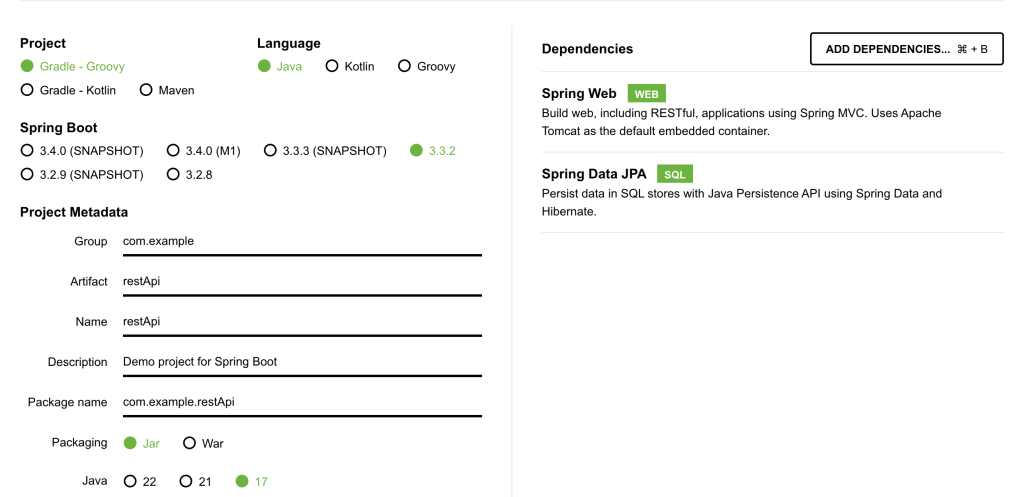
Next, we will create a simple User REST API. There are 5 main components to the REST API.

  • User class – This defines the structure of a User Entity.
  • User Repository – handles data operations.
  • User Service – contains basic methods to manipulate User objects.
  • User REST API – Contains the GET, POST etc methods to perform http operations.
  • application.properties – To define the database connection for the REST API.

Design a User Entity

User has three defining class variables – user id, user name and user email. We will also add getters and setters for these variables.

@Entity
public class User {
    @Id
    @GeneratedValue(strategy = GenerationType.IDENTITY)
    private Long id;
    private String userName;
    private String userEmail;

    public Long getId() {
        return id;
    }

    public void setId(Long id) {
        this.id = id;
    }

    public String getUserName() {
        return userName;
    }

    public void setUserName(String userName) {
        this.userName = userName;
    }

    public String getUserEmail() {
        return userEmail;
    }

    public void setUserEmail(String userEmail) {
        this.userEmail = userEmail;
    }
}

Define a User Repository

The repository will handle data operations. JpaRepository is a JPA (Java Persistence API) extension of Repository with API for basic CRUD operations and also API for pagination and sorting.

@Repository
public interface UserRepository extends JpaRepository<User, Long> {
}

Define a User Service

This service interacts with the User Repository and will be called by the REST API to perform operations.

@Service
public class UserService {

    @Autowired
    private UserRepository userRepository;

    public List<User> getAllUsers() {
        return userRepository.findAll();
    }

    public User getUserById(Long id) {
        return userRepository.findById(id).orElse(null);
    }

    public User createUser(User user) {
        return userRepository.save(user);
    }

    public void deleteUser(Long id) {
        userRepository.deleteById(id);
    }
}

Define the User REST APIs

This is the final User REST API. We need to specify @RestController for Spring Application to recognize our REST API.

We will use @GetMapping and @PostMapping annotations to mark the functionality of different endpoints of the REST API.

@RestController
@RequestMapping("/users")
public class UserController {

    @Autowired
    private UserService userService;

    @GetMapping
    public List<User> getAllUsers() {
        return userService.getAllUsers();
    }

    @GetMapping("/{id}")
    public User getUserById(@PathVariable Long id) {
        return userService.getUserById(id);
    }

    @PostMapping
    public User createUser(@RequestBody User user) {
        return userService.createUser(user);
    }

    @DeleteMapping("/{id}")
    public void deleteUser(@PathVariable Long id) {
        userService.deleteUser(id);
    }
}

Add a properties file for the Database connection

For the connection to work, you need to install MySQL connector and MySQL workbench, set up username and password and create a database called restApi. The MySQL server should be running when you run the Spring Boot Application.

spring.application.name=restApi
spring.datasource.url=jdbc:mysql://localhost:3306/restApi
spring.datasource.username=
spring.datasource.password=
spring.datasource.driver-class-name=com.mysql.cj.jdbc.Driver
spring.jpa.hibernate.ddl-auto = update

For the full code, refer to my Github project here. Run the main application and your app should now be running at localhost:8080

Using the REST API

We initially do not have any users in our database. Let’s add some users.
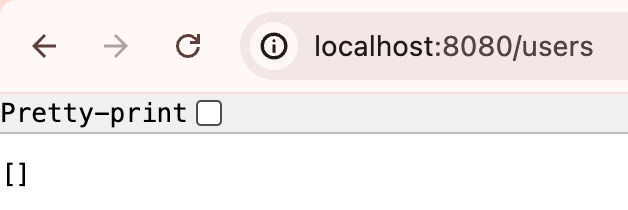
Add users

curl -X POST http://localhost:8080/users \
     -H "Content-Type: application/json" \
     -d '{
           "userName": "John Doe",
           "userEmail": "johndoe@example.com"
         }'

curl -X POST http://localhost:8080/users \
     -H "Content-Type: application/json" \
     -d '{
           "userName": "Alex",
           "userEmail": "alex@example.com"
         }'

curl -X POST http://localhost:8080/users \
     -H "Content-Type: application/json" \
     -d '{
           "userName": "Tom",
           "userEmail": "tom@example.com"
         }'

List Users
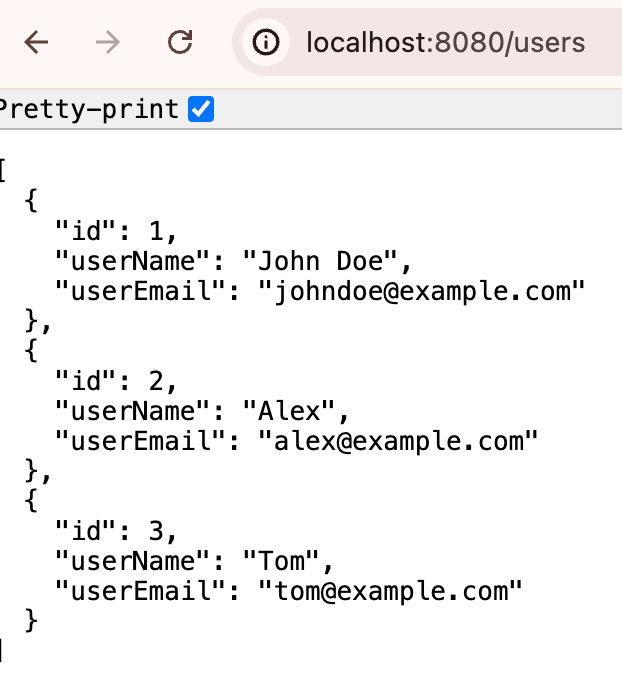
Delete User

curl -X DELETE http://localhost:8080/users/1

Now that we know how to build a simple REST API, let’s look at some best practices to keep in mind when designing REST APIs.

REST API Best Practices

Here are some best practices to adhere to when designing REST APIs.

  • Use the right HTTP methods for different operations.
  • Use nouns for resource names such as id etc. and plural forms for collections such as users, items etc.
  • Be consistent with the naming conventions.
  • Use the right HTTP Status codes.
  • Handle errors on the server side and offer meaningful debug information.
  • Add rate limiting for your application.
  • Implement the right authentication to prevent unauthorized access to the application or data.
  • Document your REST APIs for easy usage.

When to Use REST Vs Other Protocols?

There are various other protocols out there such as SOAP, gRPC, GraphQL, WebsSockets etc.

REST works well in most cases for general purpose APIs, they are simple to implement and interface with and are compatible with most web technologies.

Other protocols such as SOAP are used in more enterprise environments, gRPC is better in use cases which need high performance and low latencies, GraphQL allows more flexibility with fetching data, Web Sockets work well for real time communication APIs.

REST API Observability and Monitoring

It is important to ensure that we log meaningful information and track metrics of our system for observability and performance monitoring.

Define the key metrics for your application and track metrics such as Latency, Throughput, Error rates, CPU usage, memory usage etc. There are many tools these days such as Prometheus for metrics collection and Grafana for visualizing metrics data.

Tracking logs such as Error Logs, Access Logs is also important when designing and maintaining APIs.

Once the metrics and logs are tracked, you can set up alerting on these to take action based on various scenarios.

Summary

I hope you enjoyed reading this ultimate guide to REST APIs where we started from the basics of REST APIs, went on build a simple REST API from scratch using Java SpringBoot and went over REST API design best practices as well Observability and Monitoring to-dos for a system.

If you want to read more such articles, subscribe to my blog below.

Posted in Java Programming, Search and Ranking

Build a Simple Apache Lucene Search Application using Java Spring Boot

In this tutorial, we are going to build a bare bones Search Application using Apache Lucene and Java Spring Boot. You will learn the basics of a Lucene Search Application by the time you finish this tutorial.

I have also attached the link to the full GitHub code in case you want to dive deeper into the code right away.

What is Apache Lucene?

Apache Lucene is a powerful Open Source Java library with Indexing and Search capabilities. There is also PyLucene with Python bindings for Lucene Core. Our tutorial will be in Java. Several Search Applications that are widely used in the industry today use Apache Lucene behind the scenes. This includes Elasticsearch, Nrtsearch, Cloudera, Github, Solr etc.

In this tutorial, you will learn to set up a simple Search Application using Apache Lucene in Java Spring Boot which is also an open source tool that makes setting up RESTful applications simple and easy.

Components of a Simple Search Application

Components of a Search Application

Indexer

Inverted Index

Apache Lucene can perform fast full-text searches because of indexes that are built as Inverted Indexes. This is different from a regular index and for each term that appears in a pool of documents, the document ID and the position of that term in the document is stored. This list of doc IDs and positions is called a Postings List. The diagram below shows an example with only the doc IDs for each term. This allows fast look up during query time.

Postings List

Lucene Indexer

The Lucene Indexer does a list of steps to convert raw text documents into Inverted Indexes. These include text analysis, splitting the text into smaller tokens and other processing such as stop words removal, lemmatization etc. There are several Analyzers available in Lucene based on user and language needs. In this tutorial, we will be using the Lucene StandardAnalyzer.

We will create a Lucene Document object which gets stored in Lucene Indexes from the raw text files. A Search Query in Lucene returns a set of Documents as the result. A Document contains a collection of Fields where each Field is a combination of Field name and a value that can be retrieved at search time using a Query.

In the code example below, we declare the path to the Index Directory. This is where the index files get stored. The Index Directory is a normal file system location on the local device and you will see it being created at the mentioned path once you run the indexing method. We initialize an IndexWriterConfig instance with a Lucene StandardAnalyzer and create an IndexWriter to index all the documents.

Directory indexDirectory = FSDirectory.open(Paths.get(INDEX_DIR));
IndexWriterConfig indexWriterConfig = new IndexWriterConfig(analyzer);
IndexWriter indexWriter = new IndexWriter(indexDirectory, indexWriterConfig);

// The file can be indexed using the IndexWriter as follows.
indexDocument(indexWriter, file);

// Method where the file contents get converted to a Lucene Document object before being indexed.
private void indexDocument(IndexWriter indexWriter, File file) throws IOException {
    Document doc = new Document();
    doc.add(new StoredField("fileName", file.getName()));
    doc.add(new TextField("fileContent", new FileReader(file)));
    indexWriter.addDocument(doc);
}

We map the indexing method to the path /index in our Spring Boot Application running on localhost:8080 which will produce the following output when indexing is done. Only 5 static files are used as Documents to keep things simpler. So this is a GET method in the code example.

Lucene Indexing

Query

Query is the user-facing component of Lucene. A user can send any type of Lucene Query such as a BooleanQuery, TermQuery, PhraseQuery, PrefixQuery, PhraseQuery, FuzzyQuery etc. For our example, we are using a simple Lucene TermQuery.

A TermQuery consists of a field name and a value. Lucene will return the Documents that contain the specific term. The example below from the GET request that is sent to the search application contains the following components.

  • TermQuery – type of Query to map the Search Request to.
  • maxHits – the maximum number of documents to return for the result.
  • fieldName – the name of the Document Field
  • fieldValue – the specific Term to search for in the Lucene Documents.
body: JSON.stringify({
    "type": "TermQuery",
    "maxHits": 4,
    "fieldName": "fileContent",
    "fieldValue": "lucene"
})

We will convert the above Json Query into a Lucene TermQuery using a simple method as shown below.

public Query parseJsonToQuery() {
    return new org.apache.lucene.search.TermQuery(new Term(fieldName, fieldValue));

In this example, we want Lucene to return all Documents (maximum of 4) that contains the term “lucene” in the “fileContent” Field.

Searcher

Searching in Lucene is the process where a user Query is sent as a search request using the Lucene IndexSearcher. See below for the example.

  • IndexSearcher – used to search the single index that we created in the above step.
  • Query – the JSON request is parsed into a TermQuery in this case based on the specified type.
  • maxHits – the maximum number of Documents to return in the search response.
  • ScoreDoc[] – The indexSearcher.search() method returns a list of hits called TopDocs which are the Documents that satisfy the given Query. ScoreDoc contains the doc ID of the hit and the Relevance Score that was assigned by Lucene based on the match criteria of the Documents to the given Query.
@RequestMapping(
    value = "/search",
    method = RequestMethod.POST,
    produces = "application/json; charset=utf-8",
    consumes = MediaType.APPLICATION_JSON_VALUE)
public List<String> search(@RequestBody SearchRequest searchRequest) throws IOException {
    List<String> results = new ArrayList<>();

    Directory indexDirectory = FSDirectory.open(Paths.get(INDEX_DIR));
    IndexReader indexReader = DirectoryReader.open(indexDirectory);
    IndexSearcher indexSearcher = new IndexSearcher(indexReader);

    Query query = searchRequest.parseJsonToQuery();
    int maxHits = searchRequest.getMaxHits();

    ScoreDoc[] hits = indexSearcher.search(query, maxHits).scoreDocs;
    for (ScoreDoc hit : hits) {
      Document doc = indexSearcher.doc(hit.doc);
      results.add(doc.get("fileName"));
    }
    return results;
}

The /search POST request looks something like this.

fetch('http://localhost:8080/search', {
    method: 'POST',
    headers: {
        'Content-Type': 'application/json'
    },
    body: JSON.stringify({
        "type": "TermQuery",
        "maxHits": 4,
        "fieldName": "fileContent",
        "fieldValue": "lucene"
    })
})
.then(response => response.json())
.then(data => console.log(data))
.catch(error => console.error('Error:', error));

To send requests like this to our Spring Boot Application,

  • Go to localhost:8080 on the browser
  • Right click and choose Inspect
  • Go to Console, paste the above code and click Enter.

Alternatively, you can also send CURL requests from your terminal. Examples are linked in the readme document of the Github Repo.

You should see some results as shown below in the Console. Document 2, 5, 4 and 1 were the top ranked results by Lucene.

Searcher Response

The full code can be found on my Github. I highly recommend that you take a look to understand this tutorial well. Feel free to download the project and add more capabilities to your Search Application. One idea is to add support for more types of Lucene Queries.

Hope you enjoyed reading this tutorial on setting up a Simple Lucene Search Application using Java Spring Boot. See you in the next blog post!

Posted in Better Programming, Java Programming, Software Engineering

Basics of Java Threads

What is a thread?

A Thread in Java is a unit of execution within a process. Every Java program has atleast one thread (the main() thread). If we do not create a thread explicitly, our program runs on the main thread.

A process can therefore contain multiple threads. For this reason, creating threads is a more lightweight action compared to the resources it takes for the creation of a process. Threads terminate quickly as well compared to processes.

Why to use Multithreading?

  • To execute two or more threads at the same time and take advantage of multicore architectures
  • To run async background tasks such as logging, IO tasks etc
  • Run isolated code in parallel to increase computation speed for CPU bound processes
  • To create watchers for configuration changes

How to create threads?

Let’s look at some common ways of creating Threads in Java. There are a couple of simple ways to create threads in Java, namely

  • Implement the java.lang.Runnable interface and override the run() method
  • Extend the java.lang.Thread class and override the run() method


Method 1: Extend the java.lang.Thread class and override the run() method

public class Main {
    System.out.println("Running in main thread.");
    Thread myThread = new MyThread();
    myThread.setName("--- MyThread ---");
    myThread.start(); // This runs the thread
}

public class MyThread extends Thread {
    @Override
    public void run() {
        System.out.println("Hello from " + currentThread().getName());

        try {
            Thread.sleep(2000); 
        } catch (InterruptedException e) {
            System.out.println("MyThread was interrupted.");
            return;
        }
    }       
}
Running in main thread.
Hello from --- MyThread ---

Method 2: Implement the java.lang.Runnable interface and override the run() method

In this method, we create an instance of the class implementing the Runnable interface and pass it to the Thread() constructor.

public class Main {

    public static void main(String[] args) {
        System.out.println("Running in main thread.");
        Thread myRunnableThread = new Thread(new MyRunnable());
        myRunnableThread.start();
    }
}

public class MyRunnable implements Runnable {

    @Override
    public void run() {
        System.out.println("Hello from MyRunnable's run() method");
    }
}
Running in main thread.
Hello from MyRunnable's run() method

Method 3: Anonymous class overriding the run() method

public class Main {

    public static void main(String[] args) {
        System.out.println("Running in main thread.");

        new Thread() {
            @Override
            public void run() {
                System.out.println("Hello from the anonymous class run() method.");
            }
        }.start();
    }
}
Running in main thread.
Hello from the anonymous class run() method.

Method 4: Anonymous implementation of Runnable interface

public class Main {

    public static void main(String[] args) {
        System.out.println("Running in main thread.");

        new Thread(new Runnable() {
            @Override
            public void run() {
                System.out.println("Hello from the anonymous Runnable implementation of run() method");
            }
        }).start();
    }
}
Running in main thread.
Hello from the anonymous Runnable implementation of run() method

Gotchas

  • Every thread created in a process shares the process memory and files which can lead to concurrency problems if not handled correctly. Each Thread has its own Thread stack that only that particular thread can access.
  • A thread does not have to complete before another one starts unless we use something such as join() or interrupt() in Java or other ways to make a thread wait until another one completes execution. JVM decides when to schedule different threads to run.

Hope you learnt about the basics of Threads and some simplest ways of creating threads.

In the four methods that we saw above, threads should be instantiated and managed by developers manually. Oracle came up with a way of abstracting thread management using Executor API with its focus mainly on asynchronous processing rather than Thread management. This is a topic on its own, so let’s explore that in more detail in the next article along with synchronization of threads etc.

Posted in Better Programming, Java Programming, Software Engineering

6 Confusing Java Concepts Simplified!

Java, Software, Software Development

In this post, we will be learning about the following concepts.

  1. Instance Vs Static Methods
  2. Interfaces Vs Abstract Classes
  3. Inner Vs Anonymous Classes

1. Instance Vs Static Methods

What are static methods?

These methods are declared using the static modifier. They are mainly used when we don’t require any data access through the instance of a class. For the same reason, static methods do not have access to this keyword referring to the current instance of a class.

Syntax of Static methods

class MyClass {
    public static void staticMethodName() {
        System.out.println("This is a static method");
    }
}

// Accessing a static method
MyClass.staticMethodName();

When to use static methods?

  • Declare a method as static when it doesn’t use any class instance variables.
  • When every instance of a class should share the same copy of variables and methods, declare them as static.

What are instance methods?

Instance methods are those that are accessible through an instance of a class created using the new keyword. These methods can access the current instance of the class using this keyword.

Syntax of Instance methods

class MyClass {
    public void methodName() {
        System.out.println("This is an instance method");
    }
}

// Accessing an instance method requires an object to be created
MyClass object = new MyClass();
object.methodName();

When to use instance methods?

  • If the method uses or modifies instance variables, then declare them as instance methods.
  • When each instance of a class should have its own copy of variables, use instance variables and methods.

2. Interfaces Vs Abstract Classes

What are interfaces?

Interfaces contain declaration of methods of a class but not their implementation, but they can contain default and static methods from Java 8. Therefore, they define the type of operations that an object can perform but the details of those operations are to be defined by classes that implement an interface. They can also be Extended by other interfaces.

Interfaces cannot be instantiated because they represent a contract that the class that implements an interface will be able to perform all the operations declared in it. You can also think of it this way, if the methods contain no implementations at all to use or modify class variables, would there be any use to instantiating an interface?

Syntax of interfaces

public interface MyInterface {
    
    // Fields should be constant and are static and final
    final int number = 1;
    
    // Notice that the methods are abstract by default
    public void method1();
    public void method2();
    public void method3(int number);
}

An interface can be implemented using the implements keyword

class MyClass implements MyInterface {
    @Override
    public void method1() {
        System.out.println("Implementation of method 1");
    }

    @Override
    public void method2() {
        System.out.println("Implementation of method 2");
    }

    @Override
    public void method3(int number) {
        System.out.println("Implementation of method 3");
    }
}

An interface cannot be instantiated, but it is possible to declare a variable of an interface type and assign a class instance to it implementing that interface.

public class Main {
    public static void main(String[] args) {

        // A class instance declared using interface type
        MyInterface myClassInstance;
        myClassInstance = new MyClass();
    }
}

// This is not valid
MyInterface sampleInterface = new MyInterface();

When to use interfaces?

  • When completely unrelated classes should be able to implement the interface. Example: Comparable and Cloneable.
  • To specify the overall behavior without worrying about who implements them or how.

An excellent example of an interface is the Java collections API. Notice how various classes such as ArrayList, LinkedList and Stack all have the same APIs such as add(), isEmpty(), remove(), size() etc with different implementation details.

What are abstract classes?

Abstract classes cannot be instantiated into an object as well. They can contain methods with and without implementation details.

An abstract class can extend from only one parent class although it can implement multiple interfaces. The issue of being able to extend from only one class is not only limited to abstract classes. You can read more about the diamond problem here.

Syntax of abstract classes

public abstract class myAbstractClass {

    private String myVariable;
 
    public myConstructor(String myVariable) {
        this.myVariable = myVariable;
    }

    // Note how abstract classes can contain regular and abstract methods
    public abstract void myAbstractMethod1();
    public abstract void myAbstractMethod2();

    public String getMyVariable() {
        return myVariable;
    }
}

// Abstract classes can be extended this way
public class myExtendedClass extends myAbstractClass {

    public myExtendedClass(String myVariable) {
        super(myVariable);
    }

    @Override
    public void myAbstractMethod1() {
        System.out.println("Implementation of myAbstractMethod1");
    }

    @Override
    public void myAbstractMethod2() {
        System.out.println("Implementation of myAbstractMethod2");
    }

    public void printMyVariable() {
       System.out.println("My variable is " + getMyVariable());
    }

}

When to use abstract classes?

  • If a class contains abstract methods ie., methods without implementation details, then the class should be declared as abstract.
  • To share code with related classes.
  • To do things interfaces (Java < 9) don’t do – to enable classes to extend abstract classes and define fields or methods with access modifiers such as private, protected and to declare non-static and non-final fields.

To summarize, use abstract classes when you need a base class with certain definitions that different derived classes can share.

Java has several examples of abstract classes such as InputStream, OutputStream Reader etc. Note how they all extend only from one class but implement multiple interfaces.

3. Inner Vs Anonymous Classes

What are inner classes?

Inner classes are those that are declared inside another class or interface without a static modifier aka non-static nested classes. There are three main types.

  • Member inner class – lives inside a class
  • Anonymous inner class – to create an instance of an object with some extra functionality, to overload existing methods of a class or interface
  • Local inner class – lives inside a method

In most cases, they are declared as private so that they aren’t exposed to other classes.

The inner class can access all the member variables and methods of the outer class include private ones.

Syntax of inner classes

// This example shows a member inner class
class MyOuterClass {
    class MyInnerClass {
    }
}

// Example code to create an object of inner class
MyOuterClass outerObject = new MyOuterClass();
MyOuterClass.MyInnerClass innerObject = outerObject.new MyInnerClass();


// This example shows an anonymous inner class
// This is similar to a constructor invocation with class definition inside a block
MyClass object = new MyClass() {
                     @Override
                     public void method() {
                         System.out.println("This is an anonymous inner class with a method overriding the method of MyClass that implemented from another interface");
                     }
                 };

// To call the method
object.method();

When to use inner classes?

  • If a class is only useful inside the scope of another class and is coupled to it, then create an inner class ie., without an existing outer class object, there is no chance of existing inner class object.
  • Create an anonymous inner class to provide an additional functionality to an object.
  • To program a class that no other class can access except an outer class.
  • Declare an inner class as private if no other classes should be able to create an object of that inner class except the outer class.

What are anonymous classes?

We already learnt about anonymous classes in the previous section, but let’s get into a little more detail here. Anonymous classes are inner classes in Java that do not have a name and are declared and instantiated in the same statement.

Since they do not have a name, we can’t create instances of anonymous classes or define a constructor inside the class body.

They extend the top level class and implement an interface or extend an abstract class.

Syntax of anonymous classes

Runnable action = new Runnable() { // Runnable is a Java interface
    @Override
    public void run() {
        System.out.println("This is an anonymous class method");
    }
}; // Semicolon is important since anonymous classes are expressions

When to use anonymous classes?

  • To use a local class only once.
  • To quickly override a small amount of functionality instead of the overhead of creating a separate class.
  • To use variables or constants declared in the code right away in an anonymous class instead of passing it through the constructor of a class.
  • To avoid having to override all the unimplemented methods of an interface or abstract class.
  • Do not use them to override a lot of functionality since this can make the code unreadable.

Hope this article clarified some of the confusing concepts in Java to enable you to use them in the right places. Please feel free to give feedback if any part of article can be improved. Happy coding!

References: