Posted in Better Programming, Java Programming, Software Engineering

Basics of Java Threads

What is a thread?

A Thread in Java is a unit of execution within a process. Every Java program has atleast one thread (the main() thread). If we do not create a thread explicitly, our program runs on the main thread.

A process can therefore contain multiple threads. For this reason, creating threads is a more lightweight action compared to the resources it takes for the creation of a process. Threads terminate quickly as well compared to processes.

Why to use Multithreading?

  • To execute two or more threads at the same time and take advantage of multicore architectures
  • To run async background tasks such as logging, IO tasks etc
  • Run isolated code in parallel to increase computation speed for CPU bound processes
  • To create watchers for configuration changes

How to create threads?

Let’s look at some common ways of creating Threads in Java. There are a couple of simple ways to create threads in Java, namely

  • Implement the java.lang.Runnable interface and override the run() method
  • Extend the java.lang.Thread class and override the run() method


Method 1: Extend the java.lang.Thread class and override the run() method

public class Main {
    System.out.println("Running in main thread.");
    Thread myThread = new MyThread();
    myThread.setName("--- MyThread ---");
    myThread.start(); // This runs the thread
}

public class MyThread extends Thread {
    @Override
    public void run() {
        System.out.println("Hello from " + currentThread().getName());

        try {
            Thread.sleep(2000); 
        } catch (InterruptedException e) {
            System.out.println("MyThread was interrupted.");
            return;
        }
    }       
}
Running in main thread.
Hello from --- MyThread ---

Method 2: Implement the java.lang.Runnable interface and override the run() method

In this method, we create an instance of the class implementing the Runnable interface and pass it to the Thread() constructor.

public class Main {

    public static void main(String[] args) {
        System.out.println("Running in main thread.");
        Thread myRunnableThread = new Thread(new MyRunnable());
        myRunnableThread.start();
    }
}

public class MyRunnable implements Runnable {

    @Override
    public void run() {
        System.out.println("Hello from MyRunnable's run() method");
    }
}
Running in main thread.
Hello from MyRunnable's run() method

Method 3: Anonymous class overriding the run() method

public class Main {

    public static void main(String[] args) {
        System.out.println("Running in main thread.");

        new Thread() {
            @Override
            public void run() {
                System.out.println("Hello from the anonymous class run() method.");
            }
        }.start();
    }
}
Running in main thread.
Hello from the anonymous class run() method.

Method 4: Anonymous implementation of Runnable interface

public class Main {

    public static void main(String[] args) {
        System.out.println("Running in main thread.");

        new Thread(new Runnable() {
            @Override
            public void run() {
                System.out.println("Hello from the anonymous Runnable implementation of run() method");
            }
        }).start();
    }
}
Running in main thread.
Hello from the anonymous Runnable implementation of run() method

Gotchas

  • Every thread created in a process shares the process memory and files which can lead to concurrency problems if not handled correctly. Each Thread has its own Thread stack that only that particular thread can access.
  • A thread does not have to complete before another one starts unless we use something such as join() or interrupt() in Java or other ways to make a thread wait until another one completes execution. JVM decides when to schedule different threads to run.

Hope you learnt about the basics of Threads and some simplest ways of creating threads.

In the four methods that we saw above, threads should be instantiated and managed by developers manually. Oracle came up with a way of abstracting thread management using Executor API with its focus mainly on asynchronous processing rather than Thread management. This is a topic on its own, so let’s explore that in more detail in the next article along with synchronization of threads etc.

Posted in Better Programming, Java Programming, Software Engineering

6 Confusing Java Concepts Simplified!

Java, Software, Software Development

In this post, we will be learning about the following concepts.

  1. Instance Vs Static Methods
  2. Interfaces Vs Abstract Classes
  3. Inner Vs Anonymous Classes

1. Instance Vs Static Methods

What are static methods?

These methods are declared using the static modifier. They are mainly used when we don’t require any data access through the instance of a class. For the same reason, static methods do not have access to this keyword referring to the current instance of a class.

Syntax of Static methods

class MyClass {
    public static void staticMethodName() {
        System.out.println("This is a static method");
    }
}

// Accessing a static method
MyClass.staticMethodName();

When to use static methods?

  • Declare a method as static when it doesn’t use any class instance variables.
  • When every instance of a class should share the same copy of variables and methods, declare them as static.

What are instance methods?

Instance methods are those that are accessible through an instance of a class created using the new keyword. These methods can access the current instance of the class using this keyword.

Syntax of Instance methods

class MyClass {
    public void methodName() {
        System.out.println("This is an instance method");
    }
}

// Accessing an instance method requires an object to be created
MyClass object = new MyClass();
object.methodName();

When to use instance methods?

  • If the method uses or modifies instance variables, then declare them as instance methods.
  • When each instance of a class should have its own copy of variables, use instance variables and methods.

2. Interfaces Vs Abstract Classes

What are interfaces?

Interfaces contain declaration of methods of a class but not their implementation, but they can contain default and static methods from Java 8. Therefore, they define the type of operations that an object can perform but the details of those operations are to be defined by classes that implement an interface. They can also be Extended by other interfaces.

Interfaces cannot be instantiated because they represent a contract that the class that implements an interface will be able to perform all the operations declared in it. You can also think of it this way, if the methods contain no implementations at all to use or modify class variables, would there be any use to instantiating an interface?

Syntax of interfaces

public interface MyInterface {
    
    // Fields should be constant and are static and final
    final int number = 1;
    
    // Notice that the methods are abstract by default
    public void method1();
    public void method2();
    public void method3(int number);
}

An interface can be implemented using the implements keyword

class MyClass implements MyInterface {
    @Override
    public void method1() {
        System.out.println("Implementation of method 1");
    }

    @Override
    public void method2() {
        System.out.println("Implementation of method 2");
    }

    @Override
    public void method3(int number) {
        System.out.println("Implementation of method 3");
    }
}

An interface cannot be instantiated, but it is possible to declare a variable of an interface type and assign a class instance to it implementing that interface.

public class Main {
    public static void main(String[] args) {

        // A class instance declared using interface type
        MyInterface myClassInstance;
        myClassInstance = new MyClass();
    }
}

// This is not valid
MyInterface sampleInterface = new MyInterface();

When to use interfaces?

  • When completely unrelated classes should be able to implement the interface. Example: Comparable and Cloneable.
  • To specify the overall behavior without worrying about who implements them or how.

An excellent example of an interface is the Java collections API. Notice how various classes such as ArrayList, LinkedList and Stack all have the same APIs such as add(), isEmpty(), remove(), size() etc with different implementation details.

What are abstract classes?

Abstract classes cannot be instantiated into an object as well. They can contain methods with and without implementation details.

An abstract class can extend from only one parent class although it can implement multiple interfaces. The issue of being able to extend from only one class is not only limited to abstract classes. You can read more about the diamond problem here.

Syntax of abstract classes

public abstract class myAbstractClass {

    private String myVariable;
 
    public myConstructor(String myVariable) {
        this.myVariable = myVariable;
    }

    // Note how abstract classes can contain regular and abstract methods
    public abstract void myAbstractMethod1();
    public abstract void myAbstractMethod2();

    public String getMyVariable() {
        return myVariable;
    }
}

// Abstract classes can be extended this way
public class myExtendedClass extends myAbstractClass {

    public myExtendedClass(String myVariable) {
        super(myVariable);
    }

    @Override
    public void myAbstractMethod1() {
        System.out.println("Implementation of myAbstractMethod1");
    }

    @Override
    public void myAbstractMethod2() {
        System.out.println("Implementation of myAbstractMethod2");
    }

    public void printMyVariable() {
       System.out.println("My variable is " + getMyVariable());
    }

}

When to use abstract classes?

  • If a class contains abstract methods ie., methods without implementation details, then the class should be declared as abstract.
  • To share code with related classes.
  • To do things interfaces (Java < 9) don’t do – to enable classes to extend abstract classes and define fields or methods with access modifiers such as private, protected and to declare non-static and non-final fields.

To summarize, use abstract classes when you need a base class with certain definitions that different derived classes can share.

Java has several examples of abstract classes such as InputStream, OutputStream Reader etc. Note how they all extend only from one class but implement multiple interfaces.

3. Inner Vs Anonymous Classes

What are inner classes?

Inner classes are those that are declared inside another class or interface without a static modifier aka non-static nested classes. There are three main types.

  • Member inner class – lives inside a class
  • Anonymous inner class – to create an instance of an object with some extra functionality, to overload existing methods of a class or interface
  • Local inner class – lives inside a method

In most cases, they are declared as private so that they aren’t exposed to other classes.

The inner class can access all the member variables and methods of the outer class include private ones.

Syntax of inner classes

// This example shows a member inner class
class MyOuterClass {
    class MyInnerClass {
    }
}

// Example code to create an object of inner class
MyOuterClass outerObject = new MyOuterClass();
MyOuterClass.MyInnerClass innerObject = outerObject.new MyInnerClass();


// This example shows an anonymous inner class
// This is similar to a constructor invocation with class definition inside a block
MyClass object = new MyClass() {
                     @Override
                     public void method() {
                         System.out.println("This is an anonymous inner class with a method overriding the method of MyClass that implemented from another interface");
                     }
                 };

// To call the method
object.method();

When to use inner classes?

  • If a class is only useful inside the scope of another class and is coupled to it, then create an inner class ie., without an existing outer class object, there is no chance of existing inner class object.
  • Create an anonymous inner class to provide an additional functionality to an object.
  • To program a class that no other class can access except an outer class.
  • Declare an inner class as private if no other classes should be able to create an object of that inner class except the outer class.

What are anonymous classes?

We already learnt about anonymous classes in the previous section, but let’s get into a little more detail here. Anonymous classes are inner classes in Java that do not have a name and are declared and instantiated in the same statement.

Since they do not have a name, we can’t create instances of anonymous classes or define a constructor inside the class body.

They extend the top level class and implement an interface or extend an abstract class.

Syntax of anonymous classes

Runnable action = new Runnable() { // Runnable is a Java interface
    @Override
    public void run() {
        System.out.println("This is an anonymous class method");
    }
}; // Semicolon is important since anonymous classes are expressions

When to use anonymous classes?

  • To use a local class only once.
  • To quickly override a small amount of functionality instead of the overhead of creating a separate class.
  • To use variables or constants declared in the code right away in an anonymous class instead of passing it through the constructor of a class.
  • To avoid having to override all the unimplemented methods of an interface or abstract class.
  • Do not use them to override a lot of functionality since this can make the code unreadable.

Hope this article clarified some of the confusing concepts in Java to enable you to use them in the right places. Please feel free to give feedback if any part of article can be improved. Happy coding!

References:

Posted in Better Programming, Software Engineering

Learn the basics of Web Caching

Caching is a mechanism by which responses from the web server such as pages, images etc are stored so that when a client requests the resource again, the response is served from the cache instead of sending a request to the web server.

Why is it important to use caching?

  • Reduce the number of requests sent to the server
  • Reduce the latency of responses for the client by serving content from nearby cache instead of a remote server
  • Reduce network bandwidth by minimizing the number of times a resource is sent over the network from the web server

There are two main types of web caches. Let’s take a look at them.

Browser Cache

Browser Cache

If you are a Mac and Chrome user, you can find the the contents of the browser cache in the following path.

/Library/Caches/Google/Chrome/

The browser cache stores parts of pages, files, images etc to help them open faster during a user’s next visit. When a user clicks the back or next button in the browser, the contents are served from the cache directly. The contents of the cache are refreshed regularly after a certain amount of time or during every browser session.

How is the browser cache controlled?

There are several caching headers to define cache policy. Let’s look at the Cache-Control header in the following example which is set to private. This means that a private browser cache can store the response.

Source: redbot.com

There are different caching directives that can be used to set this header.

Caching HeadersDescription
Cache-Control: no-storeNothing should be cached about the request or response
Cache-Control: no-cacheThe cache sends a validation request to the server before serving from cache
Cache-Control: privateThe response is only applicable to a single user and must not be stored by a shared cache
Cache-Control: publicThe response can be stored by any cache
ExpiresThis header contains the date/time after which the response is considered stale. Ex: Expires: Wed, 22 Sept 2021 12:00:00 GMT
EtagThe entity-tag given in an ETag header field is used for Cache validation. One or more entity-tags, indicating one
or more stored responses, can be used in an If-None-Match header by the client for response validation.
Last-ModifiedThe timestamp given in a Last-Modified header can be used by the client in an If-Modified-Since header field for response validation
Caching Headers

For further reading, please refer to this detailed article on HTTP Caching.

Proxy Cache

Proxy Cache

Most web services these days use a proxy server as a gateway to handle requests before hitting the web servers. When a server acts as a caching proxy, it stores content and shares those resources with more users. Therefore this type of cache is also known as a shared cache. When a user sends a request, the proxy sever checks for a recent copy of the resource. If it exists, it is then sent back to the user, otherwise the proxy sends a request to the source server and caches the resulting content.

CDNs (Content Delivery Networks) are one of the most popular proxy servers. CDNs are a large network of servers geographically distributed around the world to serve content from a server closest to the user sending a request. When CDNs are configured properly, these can also help a web service prevent DDOS (Distributed Denial of Service) attacks as well.

What is cached?

HTTP caches usually cache responses to a GET request. This can be HTMP documents, images, style sheets or files such as media, javascript files etc. Secure and authenticated requests such as HTTPs will not be cached by shared caches. It is also possible to cache permanent redirects and error responses such as 404 (Not Found).

  • If the cached content is fresh (not expired or is in accordance with the max-age caching header, then it is served directly from the cache. There are other ways to determine freshness and perform cache validation, but we won’t go into the details here. I encourage you to read up on them if you’re interested.
  • If the content is stale, the must-revalidate Cache-Control directive is used to tell the cache to verify the freshness of the content.

The primary key used to cache contains the request method (GET) and the target URI (Uniform Resource Identifier). HTTP Caches are limited mostly to GET, so caches mostly ignore other methods and use the URI as the primary caching key.

Caching Best Practices

  • Consistent URLs – Use the same URL for serving same content on different pages and sites to users.
  • Library of content – Use a single source of truth library to store images and other shared content such as style sheets etc and refer to the same library from any page or site.
  • Avoid bulk modifications – The Last-Modified date will be set to a very recent once when you update too many files at the same time, so be aware of changing only the necessary ones.
  • Cache control – Use the appropriate cache control policies. If the response is private to the user, allow private caching and for generic content, set caching policy to public.
  • Use caching validators – Use the validation headers we learnt about in the table above such as Etag and Last-Modified so that caches can validate their content without having to download the resources from the server unnecessarily.
  • Max-age cache control – Set cache control to max-age for pages and images that will be updated only rarely.

I hope you enjoyed learning about the basics of web caching! In the next article, we will learn how to implement a simple cache from scratch.

Posted in Better Programming, Software Engineering

Fundamentals of HTTP Requests, Cookies and Sessions

What is HTTP?

Client Server Architecture

Hypertext Transfer Protocol is an application layer (layer 7 in the OSI model) protocol to transfer hypermedia (graphics, audio, plain text and hyperlinks etc) over the network. There are several iterations of the HTTP protocol namely

  • HTTP/1
  • HTTP/2
  • HTTP/3

Majority of the websites are using HTTP/1.1 and HTTP/2.

HTTP is a request-response based protocol for the purpose of communication in a Client-Server based architecture. HTTP commonly uses TCP (Transmission Control Protocol) underneath as its transport layer protocol to enable reliable communication.

How is HTTP stateless?

A stateless protocol is one in which the receiver does not retain any state or session information from previous requests. This means that each HTTP request is processed in isolation. IP (Internet Protocol) is another example of a stateless protocol.

On the other hand, TCP on top of which HTTP is built is a stateful protocol. This is because the client and server agree on

  • how much data will be transferred
  • order of the packets to be reassembled at either ends

which makes TCP a very reliable transport layer protocol. Within the scope of an HTTP request, the TCP connection is stateful thus ensuring reliable transfer of data. However once that request is processed and a response is sent back, no information about the request is retained. To store state information, various session management techniques are used by web servers.

What are Sessions?

Session Management is used to implement state on top of the stateless HTTP. For example: if a user logged in to a website and is authenticated, the server should not repeatedly ask for the user’s credentials with every subsequent interaction. This is accomplished by using HTTP cookies or session IDs.

HTTP Cookies

Cookies enable web browsers to store stateful information about a user session. These are chunks of data about a user’s session that is sent by the web server to a client device. More than one cookie can be stored by the browser in the user’s device.

Although authorization cookies are essential, this other type called tracking cookies have come under much scrutiny due to privacy concerns. Tracking cookies especially third-party tracking cookies are used to track your browsing history enabling behavioral advertising. Therefore European law requires that all websites targeting European Union member states gain “informed consent” from users before storing non-essential cookies on their device. So go ahead and click no when websites prompt you to accept third party cookies. Here’s a detailed article on third party cookies if you are interested.

Session ID

Session IDs or tokens are typically used in HTTP based connections to identify a user session. For example: when you are adding items to the Amazon shopping cart, the server should have a way of retaining items added to the cart even though you browse through various pages. In this case session ID or token is a way of keeping track of the user’s shopping cart.

Components of an HTTP Request

An HTTP request contains the following

  • Request Line
  • Request Headers
  • Body

Let’s look at an example GET request.

HTTP Request Line

The request line contains the name of the HTTP method to be used. We will look at all the HTTP methods in detail in another post. In the example below, GET is the HTTP method. Following the method is the URI (Unified Resource Identifier) which is the address used to locate a resource. The final part refers to the version of the HTTP protocol.

GET thatgirlcoder.com/ HTTP/1.1

Here’s a detailed example from inspecting the GET request from Google chrome.

Request URL: https://thatgirlcoder.com/
Request Method: GET
Status Code: 200 
Remote Address: 100.0.00.00:111
Referrer Policy: strict-origin-when-cross-origin

HTTP headers

Headers contain metadata to provide more information about a request. In the following example Accept and Host are headers

:authority: thatgirlcoder.com
:method: GET
:path: /
:scheme: https
accept: text/html,application/xhtml+xml,application/xml;
accept-encoding: gzip, deflate, br
accept-language: en-US,en;q=0.9
user-agent: Mozilla/5.0 (<system-information>) <platform> (<platform-details>) <extensions>

Request Body

A request body is used alongside HTTP methods which are used to change the state of the server such as PUT, POST etc. GET requests do not have a request body section.

Components of an HTTP Response

An HTTP response contains the following

  • Status Line
  • Response Header
  • Body

Status

An HTTP response contains a status code to indicate the successful completion of a request. For example:

HTTP/1.1 200 OK

Here’s a list of possible status codes and their descriptions.

Status CodesDescription
200 – 299Successful response
100 – 199Informational response
300 – 399Redirect response
400 – 499Errors on client side
500 – 599Errors on server side

Response Header

The server responds back with some HTTP headers as well. A popular one is the Set-Cookie header which the client and server use to authenticate a session.

Set-Cookie: key=fkhKFHlfhF; expires=Thur, 09-Sept-2023 12:00:00 GMT; Max-Age=4823982; Path=/; secure

Response Body

The body contains the content requested by the client. In the below example we requested an HTML document.

<!DOCTYPE html>
<html lang="en">
<head>
<meta charset="UTF-8">
<meta name="viewport" content="width=device-width, initial-scale=1">
<title>That Girl Coder – Learn and Grow Everyday!</title>

I hope you learnt some basics of HTTP requests today. Let’s keep diving deeper into this topic over the next few posts!

Posted in Better Programming, Python, Python Libraries

How to create a simple Python TCP/IP Server and Client?

Before we begin, let’s start with some basics.

Inter Process Communication (IPC)

IPC is a communication mechanism that an Operating System offers for processes to communicate with each other. There are various types of IPCs such as:

  • Pipes
  • Sockets
  • Files
  • Signals
  • Shared Memory
  • Message Queues/ Message Passing

Sockets

Sockets are used to send data over the network either to a different process on the same computer or to another computer on the network.

There are four types of sockets namely,

  • Stream Sockets
  • Datagram Sockets
  • Raw Sockets
  • Sequenced Packet Sockets

Stream sockets and datagram sockets are the two most popular choices.

Stream SocketsDatagram Sockets
Guaranteed deliveryNo delivery guarantees
Uses TCP (Transmission Control Protocol)Used UDP (User Datagram Protocol)
Needs an open connectionDon’t need to have an open connection

How are sockets used in Distributed Systems?

Distributed Systems are built using the concept of Client Service architectures.

  • Clients send requests to servers
  • Servers send back responses or error codes accordingly

The communication across servers and clients in a distributed system uses sockets as a popular form of IPC. Sockets are nothing but a combination of

  • IP Address. Ex: localhost
  • Port number. Ex: 80

Each machine (with an IP address) has several applications running on it. We need to know on which port an application is running in to send requests to it.

What is TCP/IP?

We will go into the details of communication protocols in a different article and stick to the basics for today. TCP stands for Transmission Control Protocol, a communications protocol for computers to exchange information over a network.

IP stands for Internet Protocol. IP identifies the IP address of the applications or devices to send data to and forms the Network Layer in the OSI stack. TCP defines how to transport the data over the network. Ensuring delivery guarantee is still TCP’s job.

When we send an HTTP request to a server, we first establish a TCP connection, so HTTP sits on top of TCP as the transport layer. When a user types a URL into the browser, the browser sets up a TCP socket using the IP address and port number and starts sending data to that socket. This request is sent as bytes in the form of data packets over the network. The server will then respond to the request. The benefits of a TCP connection is that a server sends acknowledgement of each packet based on which the client retransmits data in case some packets get dropped. Each packet has a sequence number that the server uses to assemble them upon receiving.

Now let’s look at an example Python program on how to write a simple script to setup a TCP/IP server and client.

Python TCP/IP server

import socket

# Set up a TCP/IP server
tcp_socket = socket.socket(socket.AF_INET, socket.SOCK_STREAM)

# Bind the socket to server address and port 81
server_address = ('localhost', 81)
tcp_socket.bind(server_address)

# Listen on port 81
tcp_socket.listen(1)

while True:
	print("Waiting for connection")
	connection, client = tcp_socket.accept()

	try:
		print("Connected to client IP: {}".format(client))
        
        # Receive and print data 32 bytes at a time, as long as the client is sending something
		while True:
			data = connection.recv(32)
			print("Received data: {}".format(data))

			if not data:
				break

	finally:
		connection.close()

Python TCP/IP Client

import socket

# Create a connection to the server application on port 81
tcp_socket = socket.create_connection(('localhost', 81))

try:
	data = str.encode(‘Hi. I am a TCP client sending data to the server’)
	tcp_socket.sendall(data)

finally:
	print("Closing socket")
	tcp_socket.close()

Terminal Output

Waiting for connection
Connected to client IP: ('127.0.0.1', 65483)
Received data: Hi. I am a TCP c
Received data: lient sending da
Received data: ta to the server
Received data:
Waiting for connection

Note:

To find and kill any applications running on a port.

List the processes running on port 81

sudo lsof -i:81

Get the PID number and kill the process

sudo kill -9 <PID>

Hope you enjoyed learning how to setup a simple TCP/IP server and client using Python.

Posted in Better Programming

6 Simple Ways to Refactor Code

Before deciding to refactor code, we will first need to understand why it needs refactoring and whether it is worth the time investment. Some of the common indicators that the code needs refactoring are:

  • The code is hard to understand
  • There’s redundant code
  • Methods are long and complicated
  • Methods are hard to test
  • Tests have a bunch of repeated setup code
  • Classes are missing functionality
  • Crucial parts of the codebase are missing tests

Now let’s look at a few simple ways to refactor code.

Fix incorrect or inconsistent naming

Variables, Methods or Classes with ambiguous names are sometimes the best low hanging fruits yet useful ones to refactor. If there is inconsistency in the naming format such as snake_case vs camelCase, make sure to use the same format throughout the code. Try and follow the convention for that specific programming language. For ex: snake_case is more popular in Python but Java code goes with camelCase. Move constants to a separate file and use all CAPS in their variable names.

// Existing Code
first_name = Person.getFirstName();
last_name = Person.getLastName();

//Refactored Code
firstName = Person.getFirstName();
lastName = Person.getLastName();

Make it modular

If you find functions that are super long and hard to understand, capture chunks of code into separate functions and give them a relevant name. Each function should focus on a specific objective. If it is starting to have more than one purpose, the other ones should be delegated to new functions. It gets tricky when you have to decide between creating an instance method vs a standalone function.

  • If a set of methods define or modify the object instantiated by a Class, then include the function as an instance method of a Class.
  • If the function cannot belong in any Class or is generic enough to be used in multiple places, then create a standalone function.
# Existing code
def extract_user_info(info_object):
    first_name = info_object["name"]["first_name"]
    last_name = info_object["name"]["last_name"]
    
    user_address = info_object["address"]["line_1"] + info_object["address"]["line_2"]

    user_age = info_object["age"]

    # Do more things with the above info
   
# Refactored Code
class UserInfo:
    def __init__(self, user_info):
        self.user_info = user_info

    def get_user_name(self):
        return " ".join(self.user_info["name"]["first_name"], self.user_info["name"]["last_name"])

    def get_user_address(self):
        return ",".join(self.user_info["address"]["line_1"], self.user_info["address"]["line_2"])

    def get_user_age(self):
        return self.user_info["age"]

    def extract_user_info(self):
        user_name = self.get_user_name()
        user_address = self.get_user_address()
        user_age = self.get_user_age()

        # Do something more with all this info


Remove duplicate code

Code duplication can creep up in many ways.

  • When a list of setup steps have to be copied over multiple times
  • When you are trying to change just one thing about a Class, but this involves changing/ adding new methods to handle this change
  • When you find yourself copy pasting the same few lines over and over again

Let’s first learn about the Single Responsibility Principle. It states that every module, class or function in a computer program should have responsibility over a single part of that program’s functionality, and it should encapsulate that part. Source: Wikipedia

  • If you find that a class is doing too many things, capture the non-core functionalities into a separate class.
  • If a class needs to have all the properties of another class but with additional/ changed functionality of certain instance methods or variables, then try to add inheritance to the classes.
  • If too many classes have similar/ duplicate functionality, then create a super class.
  • If multiple files or modules are using the same set of code lines to accomplish something, for example: setting up a database connection etc. then create a separate function for this setup and use it in all the places.

Expand incomplete classes

Classes are incomplete when they don’t provide the user with the right functions to access the method variables.

A getter method returns the value of an instance variable while a setter method sets or updates the value. These methods make it safer to access or mutate an instance variable and should be made available as instance methods of a class. Overriding the toString() method in the class that gives the textual representation of an object at any moment can be a useful addition for clients to debug the objects containing user specified values.

class User {
    private String userName;
    private int age;
    private String address;

    User(String name, int age, String address) {
        this.userName = name;
        this.age = age;
        this.address = address;
    }
    
    // Example setter method
    public void setName(String name) {
        this.userName = name;
    }
    
    // Example getter method
    public void getName() {
        return this.userName;
    }

   // Override toString method
   public String toString() {
        return this.userName + "is" + this.age + " years old and lives at: " + this.address;

Introduce type checking

This part refers to languages that use dynamic typing. Compile time type checking is super useful although Python programmers may have been very used to dynamic typing. Missing type declarations can make it quite difficult to understand the type of various parameters in the code especially when we are dealing with complex types such as maps, objects etc. This can also introduce bugs into the code if parts of it are not meticulously explained with comments so that developers don’t mishandle objects. For example: you can look into tools such as mypy to add typing to a Python code base.

def extract_user_info(user_info_map: dict[str, str]) -> str:

Add unit tests

Refactoring any code can introduce bugs if there isn’t a proper test coverage. Make sure that parts of the code that you plan on refactoring has unit tests to begin with. Then write new tests or extend the existing tests before changing the code so that you can develop iteratively using Test Driven Development.

You can go one step further and look into coverage tools that give a detailed summary of lines of code that have not been tested.

Now get refactoring!!

Posted in Better Programming

5 Useful IntelliJ Shortcuts On MacOS

1. Cmd + / or ⌘/

This is a shortcut that can be used across several IDEs to comment out a line. You can use it again to uncomment the line as well.

2. Alt + Enter

It can be annoying to see some lines of the code show up in red. This is a super useful command that gives a list of suggestions to fix your code once you place the cursor on that line and click Alt + Enter. IntelliJ also calls this the problem solving shortcut and there’s a detailed article on their blog on how you can use this to accomplish various context actions.

Alt + Enter

3. Shift Shift

This opens a search box to search everywhere across the code. You can search across Classes, Files, Symbols and Actions.

Shift Shift

4. Cmd/⌘

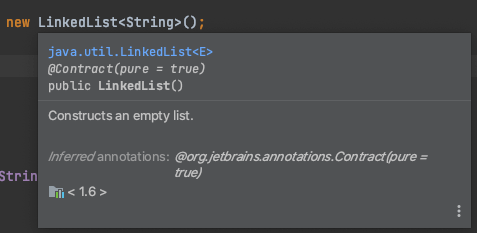
When you hover the cursor on a certain keyword, it shows a short description of the highlighted entity. If you click on it, IntelliJ displays the definition of the highlighted class, method or keyword. On the other hand holding Cmd/⌘ and clicking on the keyword will take you to the actual definition of that Datatype, Method, Class etc

Hovering over the keyword

5. Alt + Command + Arrow Keys

This is one of my super favorite shortcuts. Pressing Alt + Cmd + Left/ Right arrow keys lets you navigate back and forth between lines of code that you just looked at.

I hope this article was helpful and short enough for you to remember the shortcuts and try them out in your IntelliJ IDE!

Posted in Better Programming

Essential Git Commands To Improve Project Workflow

1. Convert a repository into a Git repository

This will create a .git sub folder in your project directory.

$ cd <PROJECT_DIRECTORY>
$ git init

2. Clone a repo and pull the latest changes

$ git clone <GIT URL>
$ git pull

3. Create a new branch

$ git checkout -b <DESCRIPTIVE BRANCH NAME>

# View all branches
$ git branch

# Checkout an existing branch
$ git checkout <BRANCH_NAME>

4. Delete a branch

# Delete a local branch
$ git branch -d <BRANCH NAME>

# Delete a remote branch
$ git push origin --delete <BRANCH NAME TO DELETE>

5. Rename a branch

# From the branch to be renamed
$ git branch -m <NEW BRANCH NAME>

# From another branch
$ git branch -m <OLD BRANCH NAME> <NEW BRANCH NAME>

# Steps to rename a remote branch after following the above steps
$ git push origin -u <NEW BRANCH NAME>

# Delete old remote branch
$ git push origin --delete <OLD BRANCH NAME>

6. Pull the latest changes from the master branch

There are two ways to pull the latest changes from master into your branch. Tip: If you are working on a complex change, pull the changes from master often (once or twice everyday depending on how frequently new changes are shipped to master). This will save a lot of time not having to deal with merge conflicts.

Do a merge

Note: In this way, you can checkout master and pull all the latest changes into your branch but will have to solve multiple conflicts that arise from this scenario. Solve any conflicts that come up after executing the following commands.

$ git checkout <YOUR BRANCH>
$ git merge master

Do a rebase

$ git checkout <YOUR BRANCH>
$ git rebase master

Not sure whether to do a merge or rebase? Checkout this tutorial on merging vs rebasing.

7. Commit and push changes

# Check the changes you have made
$ git diff

# Stage all the changes
$ git add .

# Stage only a single file
$ git add <FILE NAME>

# Commit the changes
$ git commit -m "Commit message"

# Stage changes and commit one-liner
$ git commit -am "Commit message"

# Check if everything looks okay
$ git status 

# Push changes to remote
$ git push origin master

8. Save changes locally without committing

# Save uncommitted changes in a stack where you can get it back later
$ git stash 

# To retrieve the stash and apply it on top of your branch
$ git stash apply 

# Save stash with a name
$ git stash push -m "Name of the stash"

# To view list of all stashes
$ git stash list 

# Apply a stash with index n
$ git stash apply stash@{n}

# Apply a stash and pop it from stack
$ git stash pop stash@{n}

9. Pull the latest changes into a branch

This can result in change conflicts which have to be resolved.

$ git pull

10. Check commit history

This will display an entire scrollable commit history of your repository.

$ git log

11. Merge branch with master

# Squash and merge if there are too many noisy commits
$ git checkout master
$ git merge --squash <BRANCH TO MERGE>
$ git commit

# Regular merge
$ git checkout master
$ git merge <BRANCH TO MERGE>
$ git push origin master

12. Something’s on fire! Revert!

# Revert a single commit
$ git revert <COMMIT SHA>

# Revert Multiple commits
# Note: Works well only if there are no merge commits done
$ git revert <OLDEST COMMIT SHA>..<LATEST COMMIT SHA>

# Revert multiple commits and retain commit history
# Note: Works with merge commits
$ git checkout -f <TARGET COMMIT SHA> -- .
$ git commit -m 'revert to <TARGET COMMIT SHA>'
$ git diff HEAD # To check

These commands have helped me get 90% of my work done during all these years. Special scenarios have been pretty rare and they definitely warrant a deeper understanding before diving into them. Good luck!