Posted in API Development

Getting Started with Postman: A 10 Minute Quick Guide

Postman is a popular platform that is used for API development and testing. The easy-to-use and simple interface helps make the API development process faster and more efficient.

Users of Postman can send HTTP requests and get responses which makes the API building, testing and debugging process simple.

Features of Postman

  • The Postman API enables users to access any data that is stored in the Postman account easily.
  • Postman offers a set of tools to help design, test, document APIs and also share and collaborate on the API development process.
  • Postman has different types of workspaces for personal use, teams to collaborate as well as public workspaces. These help in organizing the APIs effectively.
  • The Governance feature in Postman API gives the API design rules, industry best practices and good development practices to help teams design the best APIs for use.

Installing Postman

Postman can be downloaded and installed on your laptop for use. See here for more details. You can also use Postman on the web. There is a CLI tool and Newman which can run collections from command line.

Postman Interface – Sending an HTTP Request

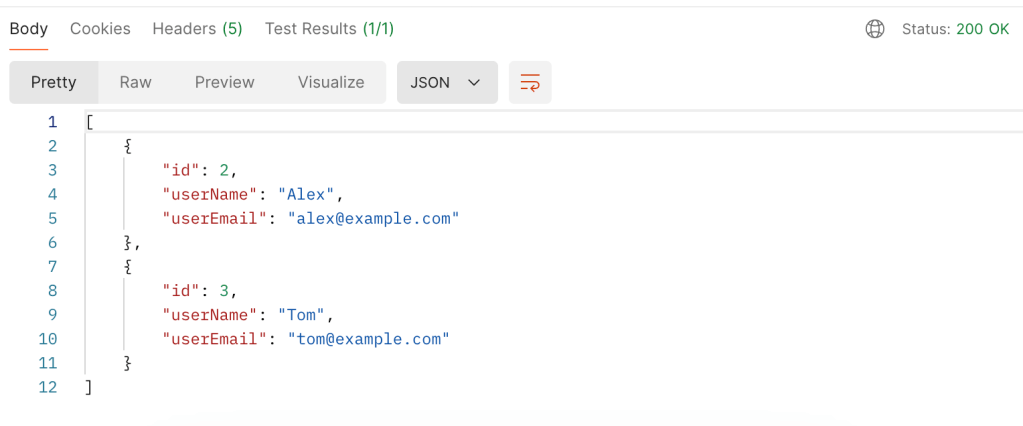
Remember the simple User REST API app that we created in a previous blog post? If you haven’t read Your Ultimate Guide to Understanding REST APIs yet, I highly recommend that you do. Now let us see how we do the GET request from Postman.

curl GET http://localhost:8080/users
  1. You can create a new request by clicking the + sign above the request tab.
  2. The drop down menu in the interface has a list of HTTP methods such as GET, POST, PUT etc. The box next to it is where we enter the URL path of our request.

3. You can add parameters, headers, authorization etc for your API below the request bar.

4. Once you click the “Send” button, the request should be sent.

5. At the bottom you will find the response window with the results, status code, time taken for the request etc.

Postman Collections

You will notice an icon called Collections on the left side. This is where you can organize your APIs based on use cases. Each collection is a set of endpoints and API calls for a particular application.

Collections can be easily saved, shared and collaborated on by importing or exporting the collections.

Authorization in Postman

Postman has a lot of different types of Authorization that can be enabled including OAuth 2.0 which is the most popular type.

To use OAuth 2.0, enter the request details in the request tab with the necessary parameters, body etc.

Click the Authorization Tab.

Select OAuth 2.0 fro the drop down menu.

Configure the Settings with the token name, type and other credentials.

Click “Request Token” once all the fields are filled out.

Once you have the token, Postman will add it to the Authorization header automatically and you can now send your requests to the API.

Postman Environment Variables

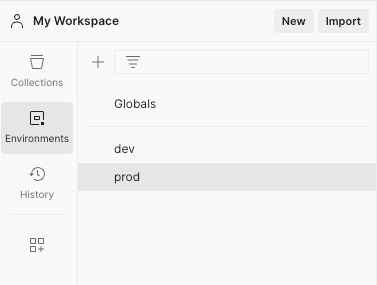
Environment Variables in Postman enable you to save values that are used frequently in variables to load them dynamically during request execution. You can use them across different environments such as prod, dev etc.

  1. Click the Environment Tab in your workspace to create a new environment.
  2. Name your environment – prod, dev etc.
  3. Add keys and values for the environment variables. The OAuth token mentioned in the previous section can be stored as an environment variable.
  4. Save the environment.

You can also save global variables in the Globals section.

To use these variables in the request, use double curly braces {{ }}. For example

  • Authorization Header
Bearer {{authToken}}
  • URL
{{baseUrl}}/users

Hope this quick guide helps you get started with Postman. There are a lot more powerful features in Postman. I have linked some additional resources below for further reading.

Additional Resources

Configure and use a Postman Mock Server

Postman Learning Center

Posted in API Development, Java Programming

Your Ultimate Guide to Understanding REST APIs

What is a REST API?

REST stands for Representational State Transfer which simply is a set of rules for software to interact with each other over the network. There are many other protocols for software to communicate with each other such as SOAP (Simple Object Access Protocol), GraphQL (An API query language), gRPC (gRPC Remote Procedure Call) etc. REST is one among them. REST is widely popular due to being simple, interoperable, lightweight and scalable. It is suited well for web services and applications with CRUD operations.

Key Features of REST APIs

Understanding Resources and URIs are key to understanding REST APIs. Resources are data objects that can be accessed via REST APIs. They are identified with a Uniform Resource Identifier (URI). HTTP methods such as GET, POST, PUT and DELETE are used to perform operations on the resources. The resources are represented in formats such as JSON, XML etc.

REST APIs have the following key features.

Client Server Architecture

REST operates on a Client-Server model where a client sends a request to the server and the server sends back an appropriate response. This is done using the URIs mentioned above. This type of model also allows for the client and server to be modified independently offering a separation of concerns.

Statelessness

REST is stateless meaning the client should have the all the information that the server needs to process a request, contained within the request. The server won’t store any client state. Each request is handled independently by the server.

Layered Architecture

REST has a layered architecture where each layer is independent and interacts with the layers interfacing with it. This enables scalability and security in the system. For example, layers such as load balancing, security etc can be added to the system and the client will not know which layers it is talking to.

REST API Methods

REST APIs use standard HTTP methods making them simpler to use.

  • GET – To retrieve data
  • HEAD – Transfer only the status line and header section
  • POST – To create a new resource
  • PUT – Update an existing resource
  • DELETE – Delete a resource
  • PATCH – Modify an existing resource partially

We will go over examples for some of these in the section below.

Build a REST API using Java Spring Boot

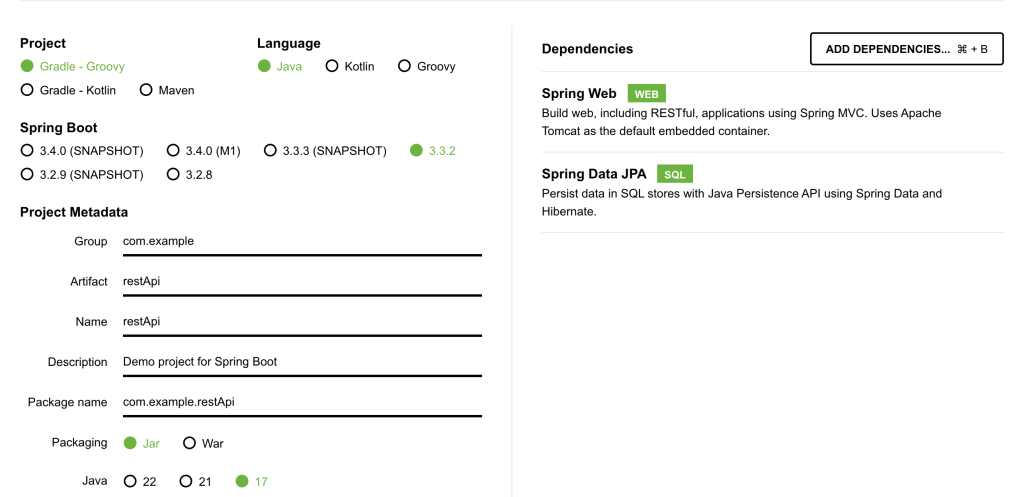
Let us build a simple User REST API using Java Spring Boot. Go to https://start.spring.io/ and generate a new project called restApi with the dependencies – Spring Data JPA (For database operations) and Spring Web (for REST APIs).

You can find the full working code on my Github link here.

Next, we will create a simple User REST API. There are 5 main components to the REST API.

  • User class – This defines the structure of a User Entity.
  • User Repository – handles data operations.
  • User Service – contains basic methods to manipulate User objects.
  • User REST API – Contains the GET, POST etc methods to perform http operations.
  • application.properties – To define the database connection for the REST API.

Design a User Entity

User has three defining class variables – user id, user name and user email. We will also add getters and setters for these variables.

@Entity
public class User {
    @Id
    @GeneratedValue(strategy = GenerationType.IDENTITY)
    private Long id;
    private String userName;
    private String userEmail;

    public Long getId() {
        return id;
    }

    public void setId(Long id) {
        this.id = id;
    }

    public String getUserName() {
        return userName;
    }

    public void setUserName(String userName) {
        this.userName = userName;
    }

    public String getUserEmail() {
        return userEmail;
    }

    public void setUserEmail(String userEmail) {
        this.userEmail = userEmail;
    }
}

Define a User Repository

The repository will handle data operations. JpaRepository is a JPA (Java Persistence API) extension of Repository with API for basic CRUD operations and also API for pagination and sorting.

@Repository
public interface UserRepository extends JpaRepository<User, Long> {
}

Define a User Service

This service interacts with the User Repository and will be called by the REST API to perform operations.

@Service
public class UserService {

    @Autowired
    private UserRepository userRepository;

    public List<User> getAllUsers() {
        return userRepository.findAll();
    }

    public User getUserById(Long id) {
        return userRepository.findById(id).orElse(null);
    }

    public User createUser(User user) {
        return userRepository.save(user);
    }

    public void deleteUser(Long id) {
        userRepository.deleteById(id);
    }
}

Define the User REST APIs

This is the final User REST API. We need to specify @RestController for Spring Application to recognize our REST API.

We will use @GetMapping and @PostMapping annotations to mark the functionality of different endpoints of the REST API.

@RestController
@RequestMapping("/users")
public class UserController {

    @Autowired
    private UserService userService;

    @GetMapping
    public List<User> getAllUsers() {
        return userService.getAllUsers();
    }

    @GetMapping("/{id}")
    public User getUserById(@PathVariable Long id) {
        return userService.getUserById(id);
    }

    @PostMapping
    public User createUser(@RequestBody User user) {
        return userService.createUser(user);
    }

    @DeleteMapping("/{id}")
    public void deleteUser(@PathVariable Long id) {
        userService.deleteUser(id);
    }
}

Add a properties file for the Database connection

For the connection to work, you need to install MySQL connector and MySQL workbench, set up username and password and create a database called restApi. The MySQL server should be running when you run the Spring Boot Application.

spring.application.name=restApi
spring.datasource.url=jdbc:mysql://localhost:3306/restApi
spring.datasource.username=
spring.datasource.password=
spring.datasource.driver-class-name=com.mysql.cj.jdbc.Driver
spring.jpa.hibernate.ddl-auto = update

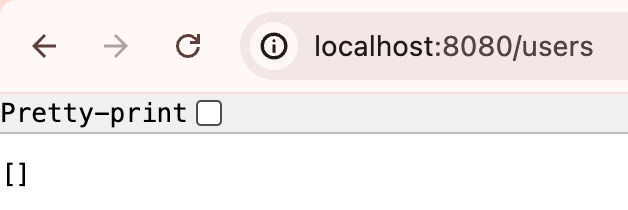
For the full code, refer to my Github project here. Run the main application and your app should now be running at localhost:8080

Using the REST API

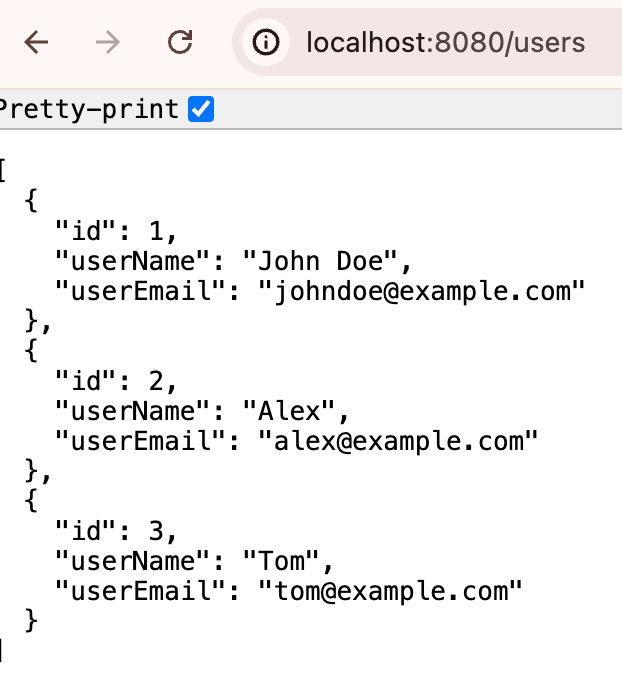
We initially do not have any users in our database. Let’s add some users.

Add users

curl -X POST http://localhost:8080/users \
     -H "Content-Type: application/json" \
     -d '{
           "userName": "John Doe",
           "userEmail": "johndoe@example.com"
         }'

curl -X POST http://localhost:8080/users \
     -H "Content-Type: application/json" \
     -d '{
           "userName": "Alex",
           "userEmail": "alex@example.com"
         }'

curl -X POST http://localhost:8080/users \
     -H "Content-Type: application/json" \
     -d '{
           "userName": "Tom",
           "userEmail": "tom@example.com"
         }'

List Users

Delete User

curl -X DELETE http://localhost:8080/users/1

Now that we know how to build a simple REST API, let’s look at some best practices to keep in mind when designing REST APIs.

REST API Best Practices

Here are some best practices to adhere to when designing REST APIs.

  • Use the right HTTP methods for different operations.
  • Use nouns for resource names such as id etc. and plural forms for collections such as users, items etc.
  • Be consistent with the naming conventions.
  • Use the right HTTP Status codes.
  • Handle errors on the server side and offer meaningful debug information.
  • Add rate limiting for your application.
  • Implement the right authentication to prevent unauthorized access to the application or data.
  • Document your REST APIs for easy usage.

When to Use REST Vs Other Protocols?

There are various other protocols out there such as SOAP, gRPC, GraphQL, WebsSockets etc.

REST works well in most cases for general purpose APIs, they are simple to implement and interface with and are compatible with most web technologies.

Other protocols such as SOAP are used in more enterprise environments, gRPC is better in use cases which need high performance and low latencies, GraphQL allows more flexibility with fetching data, Web Sockets work well for real time communication APIs.

REST API Observability and Monitoring

It is important to ensure that we log meaningful information and track metrics of our system for observability and performance monitoring.

Define the key metrics for your application and track metrics such as Latency, Throughput, Error rates, CPU usage, memory usage etc. There are many tools these days such as Prometheus for metrics collection and Grafana for visualizing metrics data.

Tracking logs such as Error Logs, Access Logs is also important when designing and maintaining APIs.

Once the metrics and logs are tracked, you can set up alerting on these to take action based on various scenarios.

Summary

I hope you enjoyed reading this ultimate guide to REST APIs where we started from the basics of REST APIs, went on build a simple REST API from scratch using Java SpringBoot and went over REST API design best practices as well Observability and Monitoring to-dos for a system.

If you want to read more such articles, subscribe to my blog below.

Posted in Search and Ranking

Fundamentals of a Distributed Search Infrastructure

Almost all of the apps that we use regularly have a search bar to retrieve results relevant to our search terms – Google, Yelp, Amazon, YouTube etc. As the traffic to these websites scale up, the corresponding Search Backend Infrastructure needs to be able to handle that volume of incoming traffic successfully while ensuring fast and efficient user experience.

We need a Distributed Search Infrastructure to handle these large-scale operations where the Indexing and Search workload is distributed across multiple servers or nodes. This ensures high Availability, Scalability and Low Latencies compared to a system with only server.

Popular Distributed Search Infrastructures

  1. E-Commerce Platforms – Amazon, Etsy etc
  2. Social Media – Instagram, YouTube, TikTok etc
  3. Web Search – Google, Bing etc
  4. Enterprise Search – Document search etc

Distributed Cluster Architecture

A distributed search cluster contains a group of nodes. Different nodes perform different functions. For example, in Elasticsearch

  • Master Node – this controls an Elasticsearch cluster responsible for many cluster level operations such as creation, deletion of indexes etc.
  • Data Node – this is where the inverted index containing the search data lives.
  • Client Node – this is used for routing the incoming search requests to other clusters.

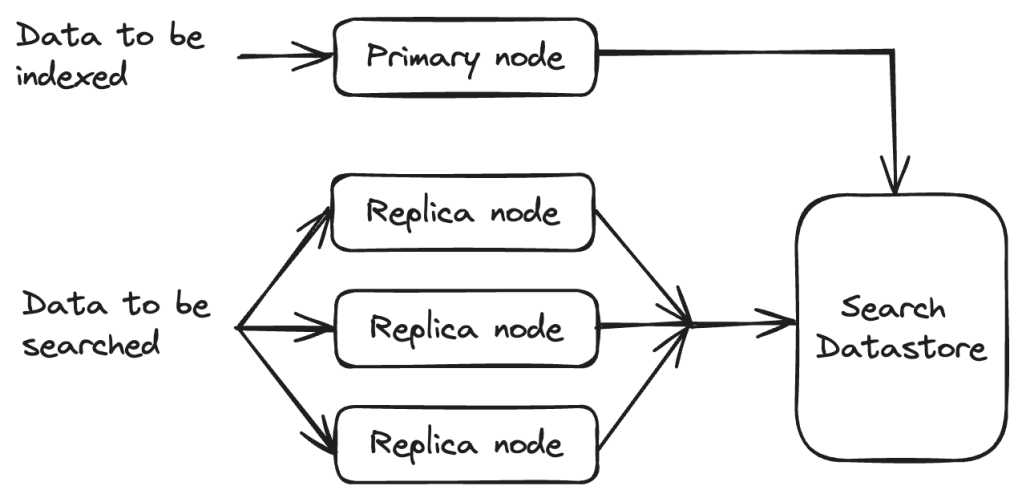
There are other search infrastructures such as Nrtsearch where Indexing and Search is split across different sets of nodes.

  • Primary – single node that does all the indexing.
  • Replica – one to several nodes that serve all the search traffic. The number of replicas can be scaled horizontally based on the traffic.
Search cluster

Distributed Search Infrastructure – Design Considerations

Scalability, Reliability, Availability and Performance are some of the crucial aspects to design a Distributed Search Infra.

Scalability

Horizontal Vs Vertical Scaling

In Horizontal Scaling, more servers are added to an existing distributed search infra to handle the increasing load. This is easier to scale and cheaper as well to add more servers to a network. This makes the infra more fault tolerant since new nodes can come up when others go down. Ensuring Data Consistency is a challenge.

In Vertical Scaling, more resources to added to existing machines (CPU, RAM etc). Although this is easier to do than adding new machines, there is a limit on how much a single machine can scale. Higher specifications mean higher costs and this is not as fault-tolerant as Horizontal Scaling.

Load Balancing

There are different ways to distribute incoming search requests to ensure that traffic is distributed across multiple servers. This ensures that no single node is overwhelmed with search requests. There are many ways to do this and some of these techniques are listed below.

  • Round Robin
  • Least Connections
  • Geo-based
  • Resource-Based
  • Weighted Round Robin
  • Weighted Least Connections etc.

Availability

High availability is achieved by ensuring that data is replicated across multiple nodes as well as regions to ensure better fault tolerance.

Replication can be done Synchronously or Asynchronously. In Synchronous replication, data is copied to replicas simultaneously and in Asynchronous replication, it is copied after the original operation completes. It is important to ensure Data Consistency during asynchronous replication.

Distributed Data Indexing

Indexing refers to storing data efficiently for fast retrieval at search time. Search Engines usually build an Inverted Index which maps terms to document IDs. The term frequency and the term positions are also stored along with the document ID. This list is commonly referred to as a Postings list.

Distributing data across multiple servers allows for scaling the cluster later as the data size increases. We need to load only a small part of the data into memory during search time. We can also employ techniques such as Scatter-Gather where the search requests are sent to multiple clusters/ shards in parallel which enables fast search operations.

Partitioning of indexes can be done in several ways:

  • ID Sharding – each shard contains a range of IDs and we try to maintain a relatively even distribution of data across the different shards.
  • Geo Sharding – each shard contains a range of documents from a certain geo location or region.
  • Hash-based Sharding – hash functions are applied to the sharding key to decide the shard to which the data is to be indexed. Hash collisions should be handled carefully.

We can also do Hybrid Sharding combining multiple sharding strategies based on the use case.

Distributed Search Operations

It is good design to have a set of coordinator nodes that take an incoming query and route it to the right node for searching. Coordinators can also send requests to multiple nodes in parallel, aggregate the results before sending a final response back to the user.

This type of parallel processing is one of the key advantages of a distributed search infrastructure.

To decide which results are the most accurate and relevant results to show to the user, search engines employ various algorithms that calculate the Precision and Recall scores before returning only the top results. Further manipulation and filtering can be done on top of these ranked results to make the results better.

There are two main types of Query Routing to do search operations:

  • Using Sharding – In this case, an algorithm will determine which shards the query needs to be sent to.
  • Scatter Gather – the query will be sent to all the nodes and the results will then be merged.

Evaluating the performance of a Distributed Search Infrastructure

We can look at a few key metrics that ensure that our Distributed Search Infrastructure is as efficient as possible and ensures the best user experience.

Indexing Speed

The speed at which data is indexed to the search infra and made available for users to search. Ensuring high indexing speeds means users are able to search on the latest data.

Search Latency

This is the time taken for the search query to execute and return a response to the user. This is key metric to ensure the best user experience.

Query Throughput

This measures the ability of the Search Infrastructure to handle a large volume of queries where many queries are made at the same time. So this is the number of queries processed per second.

Distributed Search Infrastructures form a crucial part of several websites and products that we use these days. I hope you enjoyed reading this short blog post on the its fundamentals. I will be back soon with another informative post!

Posted in API Development, Software Engineering

Master cURL: A Detailed Guide to API Testing

In this blog post, we will take a deep dive into cURL which stands for “Client URL”. It is a command line tool that helps in transferring data to and from a server to a client. cURL supports a lot of different protocols such as HTTP, HTTPS, FTP etc. cURL uses the libcURL URL transfer library.

This blog post contains the following sections.

  1. Introduction to API Testing
  2. cURL Installation
  3. Commonly Used cURL Options
  4. cURL Methods
  5. Practical Example – Google Books API

Introduction to API Testing

API stands for Application Programming Interface which is a set of rules and protocols that allows a client to interact with a software. An API contains

  • Endpoints – these are specific URLS that a client can use to access different methods and resources. Ex: /users, /texts
  • Requests and Responses – Clients send requests to a server endpoint which in turn sends back responses.
  • Data format – APIs can use various formats such as JSON or XML etc for the data being transferred between the client and the server.
  • Authentication – APIs are more secure when they verify identity of a user and require authorization before exchange of data. This can be achieved using API Keys, OAuth, Tokens etc.
  • Methods – Includes methods such as GET, DELETE, PUT, POST etc which perform various actions.

There are different types of API protocols but REST and SOAP are some of the most popular ones. In this blog post, we will use REST protocol to understand cURL commands.

There are various popular API Testing Tools such as Postman, SoapUI, REST Assured, Katalon Studio etc.

cURL Installation

I have a macOS so I use brew. But please follow the instructions here to install cURL based on your operating system.

Commonly Used cURL Options

X: Specify request method (GET, POST etc.)

-d: Send data in POST request

The “&” is used to separate the key=value pairs. You can also use -F parameter to pass form data as name=value pairs.

-H: Request headers

Users can use a Bearer token for authorization as well. The bearer token is an encrypted string that provides authentication for a client to get access to protected resources.

-I: Fetch only the HTTP Headers

This is the HTTP HEAD method to get only a resource’s HTTP headers.

-o: Save output to a file (files with same name will be overwritten)

-L: Redirect

Tell curl to follow redirect requests since curl does not perform 300 redirect requests.

-u: Username and password specification

-c: Save cookies to a file

This will save the cookies returned by the server in the cookies.txt file.

-b: Read cookies from a file

To activate the cookie engine and read cookies. cURL will see the “=” and know that cookies are specified.

-x: Use proxies

cURL Methods

There are four important cURL methods – GET, POST, PUT and DELETE.

GET Request

This is the default method when making HTTP calls with curl. The following example fetches all the users from the url.

POST Request

POST is used to send data to a receiving service. We can do this using the data or -d option.

PUT Request

PUT is used to update an existing resource. In this case update the user id #1.

DELETE Request

This example deletes the user id #1.

Practical Example – Google Books API

Now let’s walk through an actual example in the code below. In the following example, let’s use the Google Books API.

Requests need to be authenticated using the API key or OAuth. Follow the instructions in the link above to get an API key that you can use for the request below.

#!/bin/bash

# Replace with your actual API key
API_KEY="{API_KEY}"

# Define the base URL for the Google Books API
BASE_URL="https://www.googleapis.com/books/v1"

# URL-encode the query term. Harry Potter becomes "Harry%20Potter"
QUERY="Harry Potter"
ENCODED_QUERY=$(echo "$QUERY" | jq -sRr @uri)

# Function to search for books by a query
search_books() {
  echo "Searching for books with query: $QUERY"
  curl -s "${BASE_URL}/volumes?q=${ENCODED_QUERY}&key=${API_KEY}" | jq '.items[] | {title: .volumeInfo.title, authors: .volumeInfo.authors, publisher: .volumeInfo.publisher, publishedDate: .volumeInfo.publishedDate}'
}

# After URL encoding, J.K. Rowling becomes "J.K.%20Rowling"
AUTHOR="J.K. Rowling"
ENCODED_AUTHOR=$(echo "$AUTHOR" | jq -sRr @uri)

# Function to list books by a specific author
list_books_by_author() {
  echo "Listing books by author: $AUTHOR"
  curl -s "${BASE_URL}/volumes?q=inauthor:${ENCODED_AUTHOR}&key=${API_KEY}" | jq '.items[] | {title: .volumeInfo.title, publisher: .volumeInfo.publisher, publishedDate: .volumeInfo.publishedDate}' | head -n 20
}

# Main script execution
search_books

# List books by author
list_books_by_author

The output of the above bash script will be as follows.

Searching for books with query: Harry Potter
{
  "title": "Harry Potter and the Sorcerer's Stone",
  "authors": [
    "J.K. Rowling"
  ],
  "publisher": "Pottermore Publishing",
  "publishedDate": "2015-12-08"
}
{
  "title": "Harry Potter and the Chamber of Secrets",
  "authors": [
    "J.K. Rowling"
  ],
  "publisher": "Pottermore Publishing",
  "publishedDate": "2015-12-08"
}
{
  "title": "Harry Potter and the Prisoner of Azkaban",
  "authors": [
    "J.K. Rowling"
  ],
  "publisher": "Pottermore Publishing",
  "publishedDate": "2015-12-08"
}
{
  "title": "Harry Potter and the Cursed Child",
  "authors": [
    "J. K. Rowling",
    "Jack Thorne",
    "John Tiffany"
  ],
  "publisher": null,
  "publishedDate": "2017"
}
{
  "title": "The Irresistible Rise of Harry Potter",
  "authors": [
    "Andrew Blake"
  ],
  "publisher": "Verso",
  "publishedDate": "2002-12-17"
}
{
  "title": "The Psychology of Harry Potter",
  "authors": [
    "Neil Mulholland"
  ],
  "publisher": "BenBella Books, Inc.",
  "publishedDate": "2007-04-10"
}
{
  "title": "Harry Potter and the Half-Blood Prince",
  "authors": [
    "J.K. Rowling"
  ],
  "publisher": "Pottermore Publishing",
  "publishedDate": "2015-12-08"
}
{
  "title": "Fantastic Beasts and Where to Find Them: The Illustrated Edition",
  "authors": [
    "J. K. Rowling",
    "Newt Scamander"
  ],
  "publisher": "Arthur A. Levine Books",
  "publishedDate": "2017-11-07"
}
{
  "title": "JK Rowling's Harry Potter Novels",
  "authors": [
    "Philip Nel"
  ],
  "publisher": "A&C Black",
  "publishedDate": "2001-09-26"
}
{
  "title": "The Magical Worlds of Harry Potter",
  "authors": [
    "David Colbert"
  ],
  "publisher": "Penguin",
  "publishedDate": "2008"
}


Listing books by author: J.K. Rowling
{
  "title": "Conversations with J. K. Rowling",
  "publisher": null,
  "publishedDate": "2002-01-01"
}
{
  "title": "Harry Potter and the Walls of America",
  "publisher": "Createspace Independent Publishing Platform",
  "publishedDate": "2017-01-01"
}
{
  "title": "Harry Potter and the Philosopher's Stone - Ravenclaw Edition",
  "publisher": "Bloomsbury Children's Books",
  "publishedDate": "2017-06"
}
{
  "title": "Harry Potter and the Philosopher's Stone",
  "publisher": "Bloomsbury Harry Potter",
  "publishedDate": "2001"
}

Hope you are now confident with making cURL requests! In the next blog post, let us look into Postman in detail – an API testing tool that makes things way easier for API development.

Posted in Java Programming, Search and Ranking

Build a Simple Apache Lucene Search Application using Java Spring Boot

In this tutorial, we are going to build a bare bones Search Application using Apache Lucene and Java Spring Boot. You will learn the basics of a Lucene Search Application by the time you finish this tutorial.

I have also attached the link to the full GitHub code in case you want to dive deeper into the code right away.

What is Apache Lucene?

Apache Lucene is a powerful Open Source Java library with Indexing and Search capabilities. There is also PyLucene with Python bindings for Lucene Core. Our tutorial will be in Java. Several Search Applications that are widely used in the industry today use Apache Lucene behind the scenes. This includes Elasticsearch, Nrtsearch, Cloudera, Github, Solr etc.

In this tutorial, you will learn to set up a simple Search Application using Apache Lucene in Java Spring Boot which is also an open source tool that makes setting up RESTful applications simple and easy.

Components of a Simple Search Application

Components of a Search Application

Indexer

Inverted Index

Apache Lucene can perform fast full-text searches because of indexes that are built as Inverted Indexes. This is different from a regular index and for each term that appears in a pool of documents, the document ID and the position of that term in the document is stored. This list of doc IDs and positions is called a Postings List. The diagram below shows an example with only the doc IDs for each term. This allows fast look up during query time.

Postings List

Lucene Indexer

The Lucene Indexer does a list of steps to convert raw text documents into Inverted Indexes. These include text analysis, splitting the text into smaller tokens and other processing such as stop words removal, lemmatization etc. There are several Analyzers available in Lucene based on user and language needs. In this tutorial, we will be using the Lucene StandardAnalyzer.

We will create a Lucene Document object which gets stored in Lucene Indexes from the raw text files. A Search Query in Lucene returns a set of Documents as the result. A Document contains a collection of Fields where each Field is a combination of Field name and a value that can be retrieved at search time using a Query.

In the code example below, we declare the path to the Index Directory. This is where the index files get stored. The Index Directory is a normal file system location on the local device and you will see it being created at the mentioned path once you run the indexing method. We initialize an IndexWriterConfig instance with a Lucene StandardAnalyzer and create an IndexWriter to index all the documents.

Directory indexDirectory = FSDirectory.open(Paths.get(INDEX_DIR));
IndexWriterConfig indexWriterConfig = new IndexWriterConfig(analyzer);
IndexWriter indexWriter = new IndexWriter(indexDirectory, indexWriterConfig);

// The file can be indexed using the IndexWriter as follows.
indexDocument(indexWriter, file);

// Method where the file contents get converted to a Lucene Document object before being indexed.
private void indexDocument(IndexWriter indexWriter, File file) throws IOException {
    Document doc = new Document();
    doc.add(new StoredField("fileName", file.getName()));
    doc.add(new TextField("fileContent", new FileReader(file)));
    indexWriter.addDocument(doc);
}

We map the indexing method to the path /index in our Spring Boot Application running on localhost:8080 which will produce the following output when indexing is done. Only 5 static files are used as Documents to keep things simpler. So this is a GET method in the code example.

Lucene Indexing

Query

Query is the user-facing component of Lucene. A user can send any type of Lucene Query such as a BooleanQuery, TermQuery, PhraseQuery, PrefixQuery, PhraseQuery, FuzzyQuery etc. For our example, we are using a simple Lucene TermQuery.

A TermQuery consists of a field name and a value. Lucene will return the Documents that contain the specific term. The example below from the GET request that is sent to the search application contains the following components.

  • TermQuery – type of Query to map the Search Request to.
  • maxHits – the maximum number of documents to return for the result.
  • fieldName – the name of the Document Field
  • fieldValue – the specific Term to search for in the Lucene Documents.
body: JSON.stringify({
    "type": "TermQuery",
    "maxHits": 4,
    "fieldName": "fileContent",
    "fieldValue": "lucene"
})

We will convert the above Json Query into a Lucene TermQuery using a simple method as shown below.

public Query parseJsonToQuery() {
    return new org.apache.lucene.search.TermQuery(new Term(fieldName, fieldValue));

In this example, we want Lucene to return all Documents (maximum of 4) that contains the term “lucene” in the “fileContent” Field.

Searcher

Searching in Lucene is the process where a user Query is sent as a search request using the Lucene IndexSearcher. See below for the example.

  • IndexSearcher – used to search the single index that we created in the above step.
  • Query – the JSON request is parsed into a TermQuery in this case based on the specified type.
  • maxHits – the maximum number of Documents to return in the search response.
  • ScoreDoc[] – The indexSearcher.search() method returns a list of hits called TopDocs which are the Documents that satisfy the given Query. ScoreDoc contains the doc ID of the hit and the Relevance Score that was assigned by Lucene based on the match criteria of the Documents to the given Query.
@RequestMapping(
    value = "/search",
    method = RequestMethod.POST,
    produces = "application/json; charset=utf-8",
    consumes = MediaType.APPLICATION_JSON_VALUE)
public List<String> search(@RequestBody SearchRequest searchRequest) throws IOException {
    List<String> results = new ArrayList<>();

    Directory indexDirectory = FSDirectory.open(Paths.get(INDEX_DIR));
    IndexReader indexReader = DirectoryReader.open(indexDirectory);
    IndexSearcher indexSearcher = new IndexSearcher(indexReader);

    Query query = searchRequest.parseJsonToQuery();
    int maxHits = searchRequest.getMaxHits();

    ScoreDoc[] hits = indexSearcher.search(query, maxHits).scoreDocs;
    for (ScoreDoc hit : hits) {
      Document doc = indexSearcher.doc(hit.doc);
      results.add(doc.get("fileName"));
    }
    return results;
}

The /search POST request looks something like this.

fetch('http://localhost:8080/search', {
    method: 'POST',
    headers: {
        'Content-Type': 'application/json'
    },
    body: JSON.stringify({
        "type": "TermQuery",
        "maxHits": 4,
        "fieldName": "fileContent",
        "fieldValue": "lucene"
    })
})
.then(response => response.json())
.then(data => console.log(data))
.catch(error => console.error('Error:', error));

To send requests like this to our Spring Boot Application,

  • Go to localhost:8080 on the browser
  • Right click and choose Inspect
  • Go to Console, paste the above code and click Enter.

Alternatively, you can also send CURL requests from your terminal. Examples are linked in the readme document of the Github Repo.

You should see some results as shown below in the Console. Document 2, 5, 4 and 1 were the top ranked results by Lucene.

Searcher Response

The full code can be found on my Github. I highly recommend that you take a look to understand this tutorial well. Feel free to download the project and add more capabilities to your Search Application. One idea is to add support for more types of Lucene Queries.

Hope you enjoyed reading this tutorial on setting up a Simple Lucene Search Application using Java Spring Boot. See you in the next blog post!

Posted in Search and Ranking

Introduction to Information Retrieval

Information Retrieval is the process of finding the most relevant information from a large collection of data (set of documents) for a given user query. Information Retrieval is the back bone of several systems such as

  • Web Search
  • Email Search
  • Library catalogs
  • ChatGPT etc

In this post, we will be learning about the following topics.

  • General Search Process
  • Document Indexing – Inverted Index
  • Text Processing
  • Types of Retrieval Models
  • Metrics to Evaluate Search

General Search Process

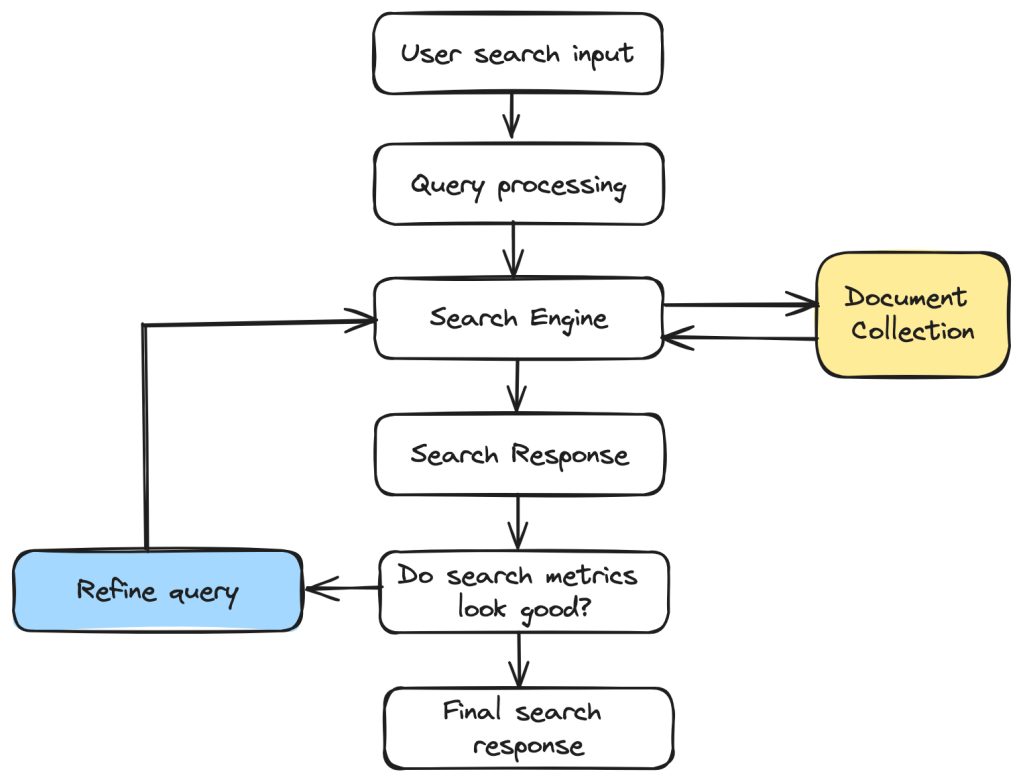
The following diagram gives an idea of the overall search process. When a user searches for a certain information, that information is transformed into a query that can be understood and processed by the search engine.

The query is then processed by the search engine to retrieve the most relevant documents from the collection. Certain metrics are used to evaluate the search response and if the results are not satisfactory, we refine the query further and reprocess it.

General search flow

Document Indexing – Inverted Index

In order to retrieve information as fast as possible, we need to index the documents efficiently. We build what is called an “Inverted Index” for fast look up of documents that are most relevant to a search input.

An inverted index is a mapping of the different terms in a large collection to a list of documents in which the term occurs. The document is usually referred to by the document ID aka doc ID. The list of doc IDs is called a postings list. A variable length postings list is used to keep it updated as documents get updated.

Terms and Postings Lists

Text Processing

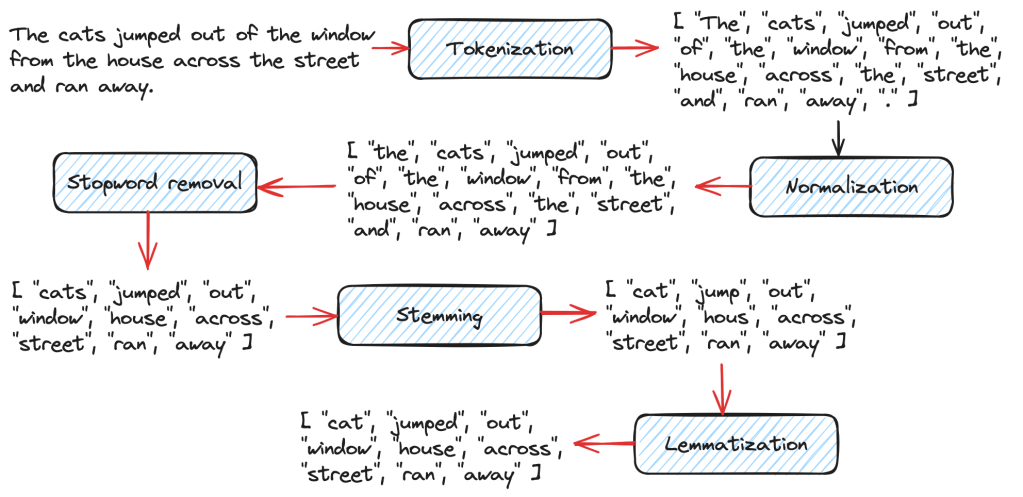
Before building the inverted index, a number of text processing steps are performed on the documents in order to retrieve information effectively and minimize storing unnecessary words.

Tokenization

This step breaks down the given documents or text into individual words called tokens.

Normalization

At this step, extraneous details such as caps lock, punctuation etc are removed.

Remove Stopwords

There are many words such as “the”, “a” etc which don’t have any significance, so these are removed.

Stemming and Lemmatization

Stemming removes unwanted prefixes and suffixes from words. For ex: running -> run, books -> book.

Lemmatizers on the other hand, transform a word to its language-specific dictionary form. This produces more linguistically accurate words.

Different stages of text processing

Types of Retrieval Models

Boolean Retrieval Model

This model can process Boolean queries that involve Boolean operators such as AND, OR, NOT etc. The inverted index is built based on the presence of terms in documents. This is simple and pretty popular but it cannot process queries that require contextual understanding.

Probabilistic Retrieval Model and BM25

This model ranks the documents based on the probability of their relevance to the search query. Okapi BM25 where BM stands for “Best Matching” is one of the most popular algorithms under the Probabilistic Retrieval Model. It calculates the document scores using various parameters such as term frequency, inverse document frequency, document length normalization etc.

Vector Space Model

In this model, data and queries are transformed into vectors in a multi-dimensional space. The number of dimensions will depend on the features used to represent the data. There are various distance metrics that can be used to compute the distance between points that capture semantic similarity but cosine distance is a popular one. This is a great model to capture contextual information.

Latent Semantic Indexing

This model captures latent semantic relationships between documents and terms using Singular Value Decomposition (SVD) to identify underlying concepts within a body of text. SVD is a technique to reduce dimensionality while preserving contextual information at the same time.

Neural Information Retrieval

NIR can capture complex semantics in text data thereby improving the accuracy and relevance of search. This model uses Neural Networks to retrieve highly relevant documents during search.

Metrics to Evaluate Search

There are two popular metrics to evaluate how good search results are. Although there are many others that we will be looking into in the future, these two are important.

  • Precision – This metric refers to the fraction of documents retrieved by search that are relevant to the user query. This points to the accuracy of the search results. Precision values are between 0 and 1 where 1 means a perfect accuracy score where all the documents were relevant to the search query.
  • Recall – This metric refers to the fraction of relevant documents retrieved by search from the total number of relevant documents in the collection. Recall values also range from 0 to 1 with 1 meaning that all the relevant documents in the collection were retrieved by the search operation.

Hope you enjoyed this Introduction to Information Retrieval post. Let us continue exploring various topics related to Information Retrieval and Semantic Search in future posts. Have a wonderful day!

Posted in AI/ Machine Learning, Search and Ranking, Software Engineering

K-Nearest Neighbors (KNN) Algorithm

We learnt about Semantic Search in my previous post. Here is the link if you missed it. K-Nearest Neighbors is one of the most popular Machine Learning algorithms used in semantic search to find documents or data that is semantically similar to a user’s query.

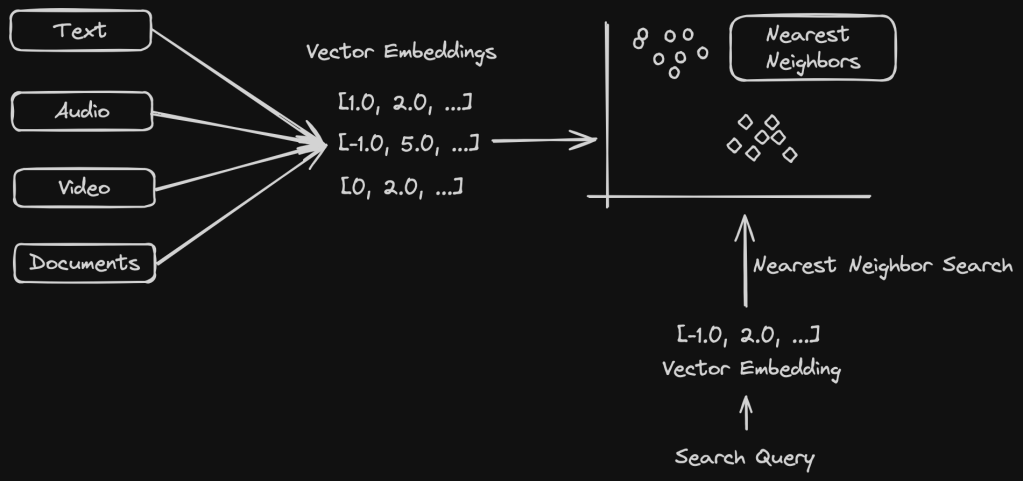
To recap, documents are represented as vector embeddings in a vector space model that captures semantic similarities based on the context. A user query is then converted to a vector embedding and efficient algorithms such as KNN, ANN (Approximate Nearest Neighbor) search are used to find the nearest neighbors to the query. This is where K-Nearest Neighbors algorithm is used where “K” refers to the number of nearest neighbors we want to consider before prediction.

Nearest Neighbor Search

How does KNN work?

KNN works by finding the “K” nearest neighbors in a vector space model. The value of K needs to be chosen carefully to balance between noise and over smoothing. One way is to test for accuracy of the algorithm by evaluating on different values of K using cross-validation where data is divided into training and validation datasets. The validation data set is used to evaluate the performance of the algorithm. A plot with K values and the corresponding error rate can help determine the best K value with the minimum error rate.

KNN finds the nearest neighbors using distance metrics. This can be anything such as Euclidean distance, Manhattan distance etc. We will look at the various distance metrics in detail in the next section.

KNN can be used for both Classification and Regression problems.

  • For Classification problems, the majority class is chosen among the K nearest neighbors.
  • For Regression problems, the average (or the weighted average) of the K nearest neighbors is used.

Distance Metrics

Various distance metrics are used for KNN, Euclidean distance being one of the most common ones.

Euclidean Distance

{\displaystyle d(p,q)={\sqrt {(p_{1}-q_{1})^{2}+(p_{2}-q_{2})^{2}+\cdots +(p_{n}-q_{n})^{2}}}.}
Source: Wikipedia

Euclidean Distance gives the straight line distance between two coordinates in a vector space. This works great for numerical features in the input data.

Manhattan Distance

{\displaystyle \sum _{i=1}^{n}|p_{i}-q_{i}|}
Source: Wikipedia

Manhattan Distance calculates the sum of absolute differences between the vector data points. This is good with categorical features. It is not as sensitive to outliers as Euclidean Distance.

Mikowski Distance

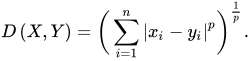
{\displaystyle D\left(X,Y\right)={\biggl (}\sum _{i=1}^{n}|x_{i}-y_{i}|^{p}{\biggr )}^{\frac {1}{p}}.}
Source: Wikipedia

Mikowski Distance is a generalization of the above distances.

  • If p = 1, we get Manhattan Distance
  • If p = 2, we get Euclidean Distance

Hamming Distance

Hamming Distance between two vectors of same length is the number of positions where the corresponding vector values are different. This is suitable for categorical and even binary data.

Cosine Similarity

{\displaystyle {\text{cosine similarity}}=S_{C}(A,B):=\cos(\theta )={\mathbf {A} \cdot \mathbf {B}  \over \|\mathbf {A} \|\|\mathbf {B} \|}={\frac {\sum \limits _{i=1}^{n}{A_{i}B_{i}}}{{\sqrt {\sum \limits _{i=1}^{n}{A_{i}^{2}}}}\cdot {\sqrt {\sum \limits _{i=1}^{n}{B_{i}^{2}}}}}},}
Source: Wikipedia

This is commonly used for high dimensional vector data or text data and it calculates the distance using the cosine of the angle between two vectors.

KNN Algorithm Example for Classification

We have a good understanding of KNN. Now let us look at an actual code example of KNN for a Classification problem.

As a coding exercise, try to implement the averaging functionality for a regression KNN algorithm on your own.

from algorithms.knn import distances

METRICS = {
    "euclidean": distances.EuclideanDistance(),
    "manhattan": distances.ManhattanDistance(),
    "mikowski": distances.MikowskiDistance(),
    "hamming": distances.HammingDistance(),
    "jaccard": distances.JaccardDistance(),
    "cosine": distances.CosineDistance()
}


def get_majority_element(computed_distances):
    """
    Takes an iterable of tuples (distance, class_type)
    and finds the majority class_type
    :param computed_distances: iterable of tuples
    :return: majority element: string
    """
    freq = {}
    for _, class_type in computed_distances:
        if class_type not in freq:
            freq[class_type] = 1
        else:
            freq[class_type] += 1
    return max(freq, key=freq.get)


def knn(training_data, k, distance_metric, test_value):
    """
    Find the k nearest neighbors in training_data for the
    given test value to determine the class type
    :param training_data: Dictionary of class type keys and list of vectors
    as values
    :param k: Integer
    :param distance_metric: string
    :param test_value: query vector
    :return:
    """

    if distance_metric not in METRICS:
        raise ValueError(distance_metric + "is not a valid input")

    distance_calculator = METRICS[distance_metric]
    computed_distances = []

    for class_type, points in training_data.items():
       for point in points:
           distance = distance_calculator.calculate(point, test_value)
           computed_distances.append((distance, class_type))

    # sort the tuples by the computed distance
    computed_distances.sort()
    return get_majority_element(computed_distances[:k])
from abc import abstractmethod, ABC
from math import pow, sqrt

ROUND_TO_DECIMAL_DIGITS = 4

class Distances(ABC):
    @abstractmethod
    def calculate(self, x1, x2):
        pass

class EuclideanDistance(Distances):
    def calculate(self, x1, x2):
        """
        Compute the Euclidean distance between two points.

        Parameters:
        x1 (iterable): First set of coordinates.
        x2 (iterable): Second set of coordinates.

        Returns:
        float: Euclidean Distance
        """
        if len(x1) != len(x2):
            raise TypeError("The dimensions of two iterables x1 and x2 should match")
        return round(sqrt(sum(pow(p1 - p2, 2) for p1, p2 in zip(x1, x2))), ROUND_TO_DECIMAL_DIGITS)

Real World Applications of KNN

KNN is used in a variety of applications such as

  • Recommendation Systems – to recommend the most popular choices among users for collaborative filtering by identifying users with similar behavior.
  • Disease Classification – it can predict the likelihood of certain conditions using majority voting.
  • Semantic Search – to find semantically similar documents or items for a user’s query.
  • Text Classification – spam detection is a good example.
  • Anomaly Detection – It can signify data points that differ from the rest of the data in a system and many many more.

I hope you enjoyed reading about K-Nearest Neighbors algorithm. We will continue to explore various topics related to Semantic Search as well as Search and Ranking in general over the next few weeks.

If you like learning about these types of concepts, don’t forget to subscribe to my blog below to get notified right away when there is a new post 🙂 Have an amazing week ahead!

Posted in Search and Ranking

Introduction to Semantic Search

Semantic search is a type of search that takes into account the meaning and context of a query from a user as opposed to lexical search which only looks for exact keyword match of the query terms.

As an example, when a user searches for the term “football”, we want the search to also consider words such as “soccer”. When “football” is misspelled as “ftball”, we still want to match with “football”.

Semantic search has the ability to dramatically improve the user experience by improving the quality of search results. This is achieved by various Machine Learning models and AI technologies.

Structured Vs Unstructured Data

Structured data is well-defined and is easily searchable whereas unstructured data can be anything such as photos, audio, videos, paragraphs of texts, emails etc and is harder to search through.

Structured data fits well into a storage solution such as a relational database and is searchable using SQL queries but unstructured data does not and needs to be processed using machine learning algorithms to get relevant search results.

As much as 80% of data out there is unstructured. This is important for semantic search because it works on unstructured data which needs to be indexed in a way that it is searchable as efficiently as possible.

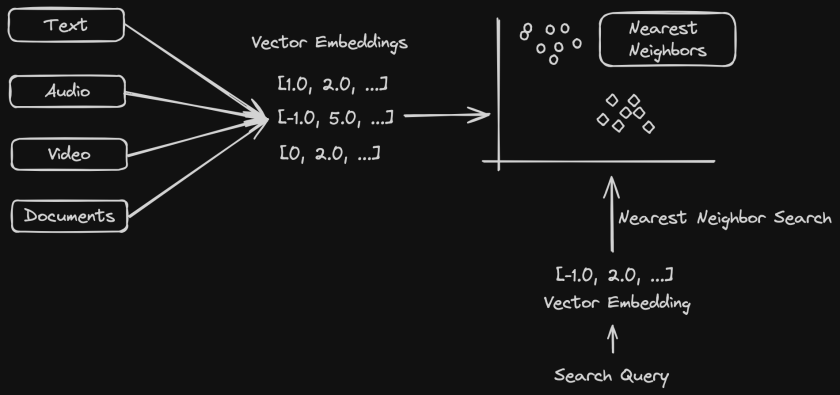
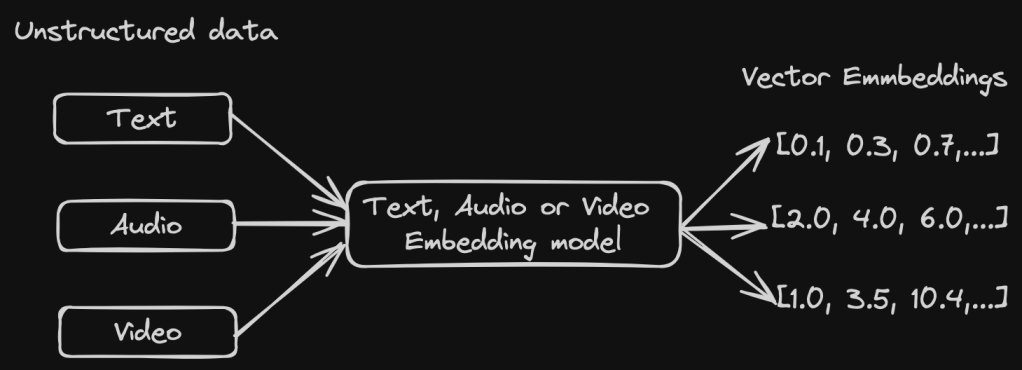
Transforming Unstructured Data Using Vector Embeddings

In order for Machine Learning algorithms to process unstructured data to get the most relevant results, this data needs to be represented in a way that the ML models can understand.

This is where Vector Embeddings become useful. Vector Embeddings represent data in numerical form. This opens up a world of computational possibilities on this data. Vector Embeddings transform unstructured data into points in the vector space where similar points get clustered together. This means words, sentences, audio data etc can be represented as vectors which get clustered together in an n-dimension vector space according to their similarity. This is then used by machine learning algorithms to find patterns using which we can do queries that find the most relevant search results.

Vector Embeddings

Here is an example of a 5 dimensional vector embedding. Each point in the vector refers to a feature representing the data.

[1.0, 3.0, 5.0, 7.0, 9.0]

There are various types of embeddings such as word embeddings, graph embeddings, image embeddings etc. The most common type of embeddings used are word embeddings which is used to represent textual data and is used in Semantic Search.

Indexing Vector Data

When data is represented as vector embeddings, it can have high dimensionality based on the number of features used to represent the data. We therefore need a way to efficiently search through large sets of vector embeddings.

Indexing the vector data in the right way helps in efficiently retrieving the most relevant results during search. There are various indexing algorithms proposed for this but a couple of them are highly popular.

Locality Sensitive Hashing (LSH)

This technique is used to do an approximate nearest neighbor search in high dimension vector space. LSH is a hashing based algorithm that will hash similar points to the same or nearby buckets with a high probability so that the search space reduces. Collisions are maximized for similar inputs unlike traditional hashing where we minimize them. This makes it faster to find the approximate nearest neighbors.

Some parameters that need tuning to achieve a good trade off between accuracy and efficiency are hash size, number of hashing functions, number of hash tables etc.

Hierarchical Navigable Small Worlds (HNSW)

HNSW is a graph based data structure that can be used for approximate nearest neighbor search. This works great for high dimensionality vector data since it navigates the graph efficiently for similarity search.

The graph data structure is organized into levels with the bottom layer containing the most data points and each layer above it being a subset of the previous one. The vertices are created such that the likelihood of a graph node appearing in top layers decreases exponentially, which helps keep the graph sparse at higher levels enabling efficient search.

During a search operation, we start at the top most layer and navigate towards the bottom of the graph to find the nearest neighbors that decrease the distance to the input data points. This means we are searching more coarsely at the top instead of having to search the entire graph and keep refining the search as we get to the bottom layer.

HNSW graph

In the example above, we want to find the nearest neighbor of the red dot. So we start at the top most layer at an entry point node and traverse to the neighbor, we then go to the next levels to try and find the nearest neighbor. This is an oversimplification of HNSW works but we will look at this topic in detail on another post.

HNSW are efficient and have good accuracy, thereby being the most popular algorithm for vector similarity search at the moment. HNSW may not suit data that gets frequent updates since reconstructing the graph often is an expensive process.

Searching on Vector Data

Vector Search

Vector search also known as nearest neighbor search is what powers several semantic search use cases. This works efficiently on vector embeddings that we learnt about in the previous section. Since the search query is also represented as a vector, finding the most relevant results would mean searching for the nearest neighbors for the given query data.

The most popular algorithm for doing a nearest neighbor search in kNN – k nearest neighbor search. This provides highly accurate results but it is also computationally intensive. For large language model datasets, this does not scale well. So in these cases, the ANN – Approximate Nearest Neighbor search works much better at the cost of slightly reduced accuracy. We will learn about KNNs and ANNs in future posts on this topic.

Hope you enjoyed learning about semantic search. Let’s continue to explore this topic in more detail.

Posted in Software Engineering

HTML and CSS basics for Backend Engineers

HTML (Hyper Text Markup Language) and CSS (Cascading Style Sheets) are both important technologies used in Web Development but when I came into Backend Development I did not know much about these. I still haven’t had the need to work with them except for a newsletter that I was putting together every month for a year but that made me feel interested to learn more. This article will go over some of the basics that are useful to know as a Backend Developer with a lot of useful resources for further study.

HTML

A basic HTML document is a text file made up of elements and tags. The first page is named as index.html. There are various tags but the following make the overall outline of the document.

  • <!DOCTYPE html> as the first line of an html document so that browsers can render the page correctly.
  • <head></head> contains any machine readable information
  • <html></html> that contains all the document content
  • <body></body> which contains all the parts visible in a browser
<!DOCTYPE html>
<html>
<title>Title</title>
<head>
</head>
<body>
    <h1>This is the first heading</h1>
    <p>This is the first paragraph</p>
</body>
</html>

HTML Tags

Here are a few other important html tags.

TagDescription
<h1></h1> to <h6></h6>Heading tags
<p></p>Paragraph tag
<img src=”image.jpeg” alt=”Name of the image” width=”100″ height=”100″>Image tag
<a href=”www.wordpress.com”>Text for this link</a>HTML links
<table></table>Table
<th></th>Table header
<tr></tr>Table row
<td></td>Table data
<div></div>Container for HTML block level elements and styling
<span></span>Used to organize inline elements
<link>Link a CSS stylesheet

Here is a simple webpage using some of the above elements. Try it in your own browser as well!

<!DOCTYPE html>
<html>
<title>HTML AND CSS</title>
<head>
</head>
<body>
<h1>HTML and CSS basics</h1>
<p1>Differences between HTML and CSS</p1>
<br></br>
<table border="1">
    <tr>
        <th>HTML</th>
        <th>CSS</th>
    </tr>
    <tr>
        <td>Stands for Hyper Text Markup Language</td>
        <td>Stands for Cascading Style Sheets</td>
    </tr>
    <tr>
        <td>Used to build static web pages and applications</td>
        <td>Used to enhance the presentation of an HTML document</td>
    </tr>
</table>
<a href="thatgirlcoder.com">Learn more here!</a>
</body>
</html>

This is the web page as rendered by the browser.

You can find a list of all HTML elements here.

Block vs Inline Elements

InlineBlock
Does not start in a new lineAlways starts in a new line
Takes up as much width as needed onlyTakes up full width
Examples: <span>, <a>, <br>, <img> etc.Examples: <p>, <div>, <table>, <form>,

CSS

CSS stands for Cascading Style Sheets and a styles.css file can be defined to link to an HTML document to change its styling.

CSS can be applied to an HTML page either internally or externally. To use it internally, the <style> tag is used as follows.

<!DOCTYPE html>
<html>
<head>
    <title>Title</title>
    <style>
        body {
            background-color: #e1b382;
        }
    </style>
</head>
</html>

To apply an external stylesheet, the <link> tag is used as shown below.

<head>
    <link rel="stylesheet" type="text/css" href="<CSS_FILE_NAME">
</head>

Selectors

In CSS, different types of selectors are used to select various HTML elements to apply styling rules to. Some of the important type of selectors are as follows.

Element Selectors

This is used to select HTML elements based on type such as <p>, <h1> etc.

<h1>This is a heading</h2>
.h1{
    color: #xyz;
}

ID Selectors

This uses the ID attribute of an HTML element.

<div id="section"></div>
#section{
    color: #xyz;
}

Class Selectors

Selects using the class attribute of HTML elements.

<p class="paragraph">Start reading!</p>
.paragraph {
    color: #xyz;
}

Descendant Selectors

This is used to select HTML elements contained within another selector. In the below example, the color will be applied to all the <h1> elements that are descendants of the span ID element.

<span id="span">
    <h1>Heading 1</h1>
    <h1>Heading 2</h1>
</span>
#span h1{
    color: #xyz;
}

Child Selectors

This is more specific that descendant selectors. This will select the immediate descendants (ie., children) of a parent selector. In the below example, the color will be applied only to the immediate children of the “section” Id which are “Heading 1” and “Heading 2”

<div id="section">
    <h1>Heading 1</h1>
    <h1>Heading 2</h1>
    <div>
        <h1>This is a nested heading</h1>
    </div>
</div>
#section > h1 {
    color: #xyz;
}

CSS Box Model

The box model consists of the following properties to represent an HTML element as a box.

  • Content – text, images etc
  • Padding – area around the content
  • Border – non-transparent area around the content and padding
  • Margin – area around the border

I like to remember this as MBCP from outer most Margin to inner most Content.

div {
  width: 200px;
  border: 10px blue;
  padding: 20px;
  margin: 20px;
}

Now let’s design a super simple food menu as shown below. I have included the css code in the same file so that you can use it in any online code editor.

<!DOCTYPE html>
<html>
<head>
    <title>Veg Paradise</title>
    <style>
        body {
            background-color: #e1b382;
        }
        h1 {
            color: #12343b;
        }
        h2 {
            color: #c89666;
        }
        .center-text {
            margin-left: auto;
            margin-right: auto;
            text-align: center;
            padding-top: 12px;
            padding-bottom: 12px;
            background-color: #2d545e;
        }
        p {
            color: #12343b;
        }
        h2 > span {
            color: #FA9F42;
            font-size: 0.75em;
        }
        #copyright {
            font-size: 0.75em;
        }
    </style>
</head>
<body>
    <div class="center-text">
        <h1>Food Menu</h1>
        <h2>Moong dal cheela <span>New!</span></h2>
        <p>Yellow split lentils, ginger, green chillies.</p>
        <h2>Pesarattu</h2>
        <p>Whole green gram, ginger, green chillies, cumin seeds.</p>
        <h2>Idly</h2>
        <p>Fermented rice batter.</p>
        <h2>Idiyappam</h2>
        <p>Rice noodles, shredded coconut served with peanut curry.</p>
        <h2>Dosa</h2>
        <p>Fermented rice batter.</p>
        <h2>Millet upma</h2>
        <p>Pearl millet, mixed vegetables.</p>
        <h2>Vegetable poha</h2>
        <p>Flattened rice, chickpeas, mixed vegetables flavored with lemon juice.</p>
    </div>
    <div class="center-text">
        <p id="copyright">
            Copyright Veg Paradise
        </p>
    </div>
</body>
</html>

Hope you learned the basics of HTML and CSS to navigate web development as a Backend Engineer. I recommend the following resources when you are programming.

Resources

Posted in Arrays and Strings, coding interview preparation, Data Structures/ Leetcode, Leetcode Top 150, Two Pointer Technique

[Problem Solving] Remove duplicates in a sorted array in-place

Problem Statement

Given an array of integers sorted in increasing order, remove the duplicates in-place such that each unique element appears only once. The relative order of the elements should be kept the same. Return k after placing the final result in the first k slots of nums.

Examples

Input: nums = [1,1,2]
Output: 2, nums = [1,2,_]
Input: nums = [0,0,1,1,1,2,2,3,3,4]
Output: 5, nums = [0,1,2,3,4,_,_,_,_,_]

This is one of my favorite and easy array problems to start thinking in terms of two pointers to solve array problems. Why two pointers in this case?

We need a pointer that will read the elements of the array one by one. We can use another pointer to overwrite the elements in place. Also whenever we want to modify elements of an array in place – think about whether the two pointer technique can be applied!

The read pointer, let’s say r is pretty straightforward where we increment its value by one during each iteration. The only problem to solve here is to understand when to move the write w pointer.

In this problem, we are going to always compare two elements to each other to find out if it is a repeated value. This naturally leads to maintaining two variables prev and curr to keep track of the previous element to compare the current one with. Now for moving the write pointer,

  • Each time prev = curr, we move the read pointer r and not the write pointer w. This is so that we keep reading the elements until we find the element to overwrite with.
  • When prev != curr, we can now overwrite the array element, increment w and r as well as set prev to curr.

Let’s see how this works using the following diagram. Note that only r and w are variables that we use for the two pointer technique here. Prev and curr are variables to keep track of the previous and current elements.

Complexity

O(N) to traverse the array and O(1) space since we modify the array in-place.

Solution

def removeDuplicates(self, nums: List[int]) -> int:
    if not nums:
        return 0
    if len(nums) == 1:
        return 1
             
    r, w = 1, 1
    prev = nums[0]
    while (r < len(nums) and w < len(nums)):
        curr = nums[r]
        if prev != curr:
            nums[w] = curr
            w += 1
            prev = curr
        r += 1
    return w

Hope you enjoyed learning to solve this array problem with the two pointer technique.