
1. Cmd + / or ⌘/
This is a shortcut that can be used across several IDEs to comment out a line. You can use it again to uncomment the line as well.
2. Alt + Enter
It can be annoying to see some lines of the code show up in red. This is a super useful command that gives a list of suggestions to fix your code once you place the cursor on that line and click Alt + Enter. IntelliJ also calls this the problem solving shortcut and there’s a detailed article on their blog on how you can use this to accomplish various context actions.

3. Shift Shift
This opens a search box to search everywhere across the code. You can search across Classes, Files, Symbols and Actions.

4. Cmd/⌘
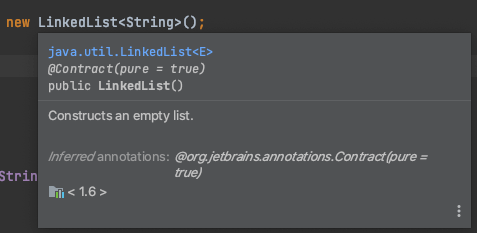
When you hover the cursor on a certain keyword, it shows a short description of the highlighted entity. If you click on it, IntelliJ displays the definition of the highlighted class, method or keyword. On the other hand holding Cmd/⌘ and clicking on the keyword will take you to the actual definition of that Datatype, Method, Class etc

5. Alt + Command + Arrow Keys
This is one of my super favorite shortcuts. Pressing Alt + Cmd + Left/ Right arrow keys lets you navigate back and forth between lines of code that you just looked at.
I hope this article was helpful and short enough for you to remember the shortcuts and try them out in your IntelliJ IDE!

 That Girl Coder